



Most business website redesigns take roughly two to four months from kickoff to launch. A small site with a clear brief can land closer to eight weeks. A larger site with e-commerce, integrations or heavy content can run six months or more. The calendar is rarely set by design or code. It is set by how fast your team makes decisions and delivers content.
This guide walks through each phase of the process, gives realistic week ranges, shows where projects stall and explains how to build a schedule your team can actually keep.
TL;DR
- Plan on 8 to 16 weeks for a typical small-to-mid-sized business site, and 16 to 24 weeks or more for large, e-commerce or integration-heavy projects.
- A marketing site on a CMS can move from kickoff to go-live in about nine weeks, plus a week of post-launch fixes, when the client side stays on schedule.
- The most common cause of delay is late copy, late images and slow approvals, not technical difficulty.
- Agree on feedback rounds, a single approver and content deadlines before kickoff.
- Map redirects, test performance and check accessibility before launch, not after.
Table of Contents
- How Long a Website Redesign Really Takes
- The Phases of a Website Redesign, Week by Week
- What Slows a Redesign Down
- Before You Launch: Redirects, Speed and Accessibility
- Our Perspective: Schedule Around Decisions, Not Deliverables
- How to Build a Schedule That Holds
- Work With a Team That Plans Content and Code Together
- FAQ
- Sources
How Long a Website Redesign Really Takes
Published estimates vary because they describe different projects. A ten-page brochure site and a 200-page site with a product catalog share almost nothing except the word “redesign.” Use scope, not averages, to set your own expectation.
| Site type | Typical scope | Realistic timeline |
|---|---|---|
| Small | 8 to 15 pages, one primary goal | 6 to 10 weeks |
| Mid-size | 20 to 50 pages, a blog or resource section, a few integrations | 10 to 16 weeks |
| Large or complex | 75+ pages, e-commerce, custom features, multiple audiences | 16 to 24 weeks |
| Enterprise | Multiple regions, departments or systems | 6 months or longer |
These ranges reflect what we see across industry guidance and our own project work. Treat them as planning ranges, then adjust for the four factors that move a schedule the most:
- Page count and content volume. Every page needs copy, imagery and review.
- Custom functionality. Booking tools, customer portals, CRM or marketing-automation connections and e-commerce add build and testing time.
- Number of decision-makers. Each additional approver adds review time and the risk of contradictory feedback.
- Content readiness. A project with finished copy and photography at kickoff moves in weeks. One that starts writing during design does not.
If you are still deciding whether a redesign is the right move, read when brands should redesign their websites for growth first. If budget is the next question, our guide to website redesign cost covers what U.S. businesses should plan for.
The Phases of a Website Redesign, Week by Week
The sequence below fits a mid-size business site of roughly 10 to 12 weeks. Phases overlap, so the weeks are approximate. On a smaller site you compress them. On a larger one you stretch them.
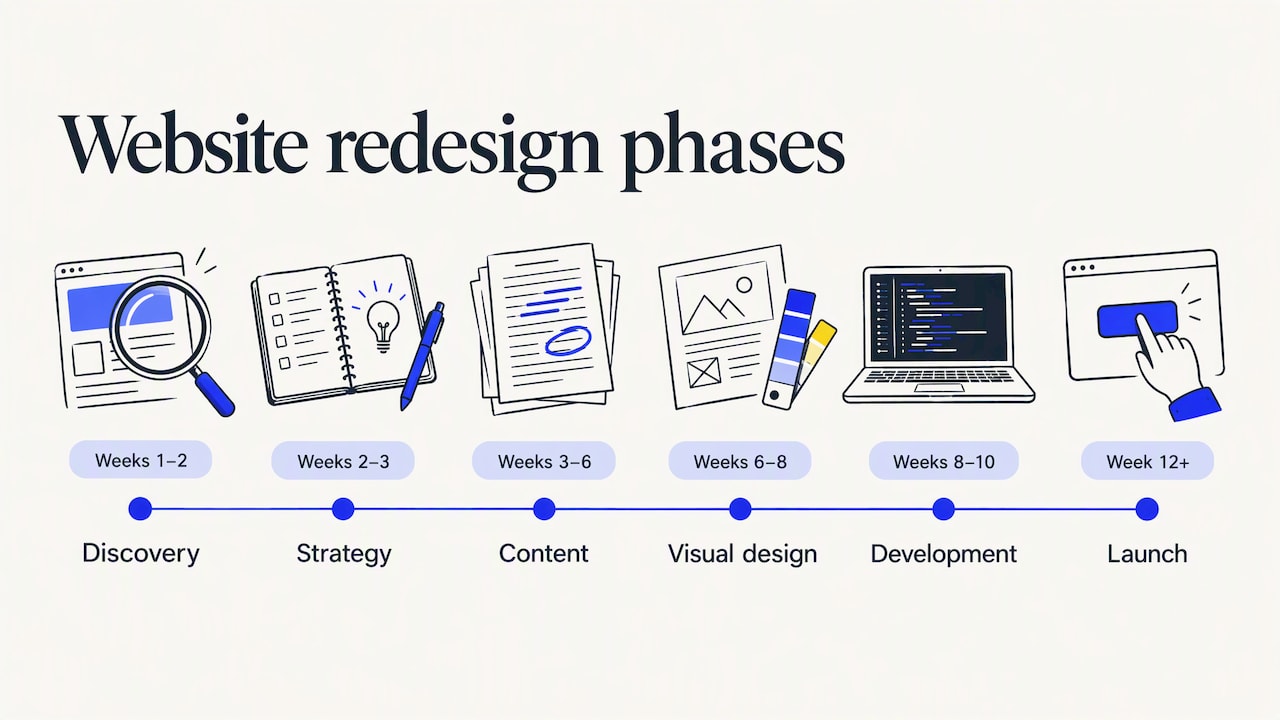
Phase 1: Discovery and goals (weeks 1 to 2)
Discovery sets the targets everything else is measured against. You audit the current site, review analytics, interview stakeholders and define what the new site must do.
The most useful output is a short list of measurable goals. “Make it modern” is not a goal. “Increase qualified form submissions” or “reduce support calls about pricing” is. Specific targets let you judge design choices objectively later, and they stop the project from drifting into opinion.
By the end of this phase you should have:
- A written project goal and two or three success metrics
- A baseline of current traffic, conversion rate and top-performing pages
- A named project lead and a single final approver
- A signed scope that lists pages, features and integrations
Phase 2: Strategy and site architecture (weeks 2 to 3)
This phase decides what pages exist, how they connect and what each one is for. You build a sitemap, define navigation and identify which current pages to keep, merge, rewrite or retire.
This is also the time to plan URLs. If page addresses will change, a redirect map starts here, not at launch. Keep a spreadsheet of every old URL and its new destination.
Phase 3: Content creation and copywriting (weeks 3 to 6)
Content is where most schedules are won or lost. Copy, product descriptions, team bios, case studies, photography and video all have to exist before the site can be finished. Writing happens in parallel with early design, but it should finish well before development ends.
Plan for this phase to take longer than it looks. Subject-matter experts are busy, legal review takes time and approvals slip. Set dates for every content deliverable at kickoff and treat them as part of the contract.
Visual content deserves its own line in the plan. Original photography and video usually outperform stock because they show your real team, space and product. Shoots need scheduling, editing and approval, so book them early. Our corporate photography and video production work is often scheduled in this window so the finished assets are ready when designers need them.
Phase 4: Visual design (weeks 6 to 8)
Design typically starts with wireframes for key templates, such as the home page, a service page and a contact page. After the structure is approved, designers apply brand guidelines, typography, color and imagery to produce full mockups for desktop and mobile.
Keep the number of templates small. Most sites need five to ten unique layouts, not one per page. Fewer templates means faster design, faster development and easier maintenance.
For guidance on layout choices that support lead generation, see our notes on conversion-focused website design and the website conversion elements that matter most.
Phase 5: Development and build (weeks 8 to 10)
Developers turn approved designs into a working site on a CMS or custom stack. They build templates, load content, connect forms and analytics, and set up integrations.
A staging site lets your team review real pages in a browser before anything goes live. Review it on a phone as well as a laptop, because a large share of visits will come from mobile.
Phase 6: Review, testing and QA (weeks 10 to 11)
Testing should cover far more than broken links. A solid QA pass includes:
- Cross-browser and device checks on current versions of Chrome, Safari, Edge and Firefox, plus iOS and Android
- Form and integration tests to confirm leads reach your inbox and CRM
- Performance against Google’s Core Web Vitals thresholds
- Accessibility against WCAG 2.1 AA
- Redirect testing across every old URL
We cover the performance and accessibility targets in more detail below.
Phase 7: Launch and post-launch support (week 12 and after)
Launch day should be uneventful. The site has been tested, redirects are mapped, analytics are firing and your team knows who to call. Plan the switch for a low-traffic window, and keep your developers available for the first few days.
Expect a short fix list. One schedule from a project-planning template allows about a week after go-live for fixes, which is a sensible allowance for any project. Then watch the metrics you defined in discovery, not just overall traffic.
What Slows a Redesign Down
Most delays come from the client side of the table, and they are predictable.
Late content and slow approvals
Waiting on finished copy, image assets or stakeholder sign-off is the most common reason timelines stretch. Project-planning guidance points to the same few jobs the client owns, namely content, feedback and approvals, as the places schedules slip. The fix is simple: put content due dates in the agreement at kickoff and tie them to the launch date. If copy is two weeks late, launch moves two weeks.
Too many opinions
Design by committee is a reliable way to add revision cycles. When five people send five different notes on the same mockup, the designer has to reconcile them, and the result often satisfies nobody. Name one person who consolidates feedback and holds sign-off authority. Everyone else contributes through that person.
Unlimited revisions
Agree on the number of feedback rounds up front. Two structured rounds per phase is common and workable. It forces reviewers to gather their thoughts and gives the team a clear definition of “done.”
Scope creep
“While we’re at it” requests, such as a new portal, a second language or a product configurator, can add weeks. Keep a parking lot for ideas that arise mid-project and schedule them as phase two.
Designing before strategizing
Jumping to visuals before the goals and architecture are settled leads to rework. The discovery and planning phases feel slow, yet they are the cheapest place to fix mistakes.
Before You Launch: Redirects, Speed and Accessibility
Three checks are easy to defer and expensive to skip.
Redirects and SEO
If any URLs change, every old address needs a permanent redirect to its closest new equivalent. Google’s documentation on site moves with URL changes recommends keeping permanent redirects in place for at least a year and avoiding long redirect chains. Map them during the architecture phase and test them during QA. Do not redirect everything to the home page, because that discards the relevance each old page earned.
Performance
Google defines a “good” experience through Core Web Vitals. According to web.dev, a page should have a Largest Contentful Paint of 2.5 seconds or less, an Interaction to Next Paint of 200 milliseconds or less, and a Cumulative Layout Shift of 0.1 or less, measured at the 75th percentile of page loads. Large unoptimized video and image files are a frequent cause of failures, so have your production team deliver web-ready formats and test early on staging.
Accessibility
In the United States, website accessibility is a live legal issue under Title III of the Americans with Disabilities Act. Settlement agreements published by the Department of Justice have required conformance with WCAG 2.1 Level AA, as in this settlement agreement with a national pharmacy chain. That is not a statute that sets a fixed standard for every business, so ask your own counsel what applies to your organization. Practically, build accessibility into design and QA: color contrast, keyboard navigation, alt text and captions for video. Retrofitting after launch costs more time than building it in.
Our Perspective: Schedule Around Decisions, Not Deliverables
We produce video and photography for brands and event teams, and we build the websites those assets live on. That puts us in an unusual seat: we see how a redesign looks when the content is ready and when it is not.
Our view is that a website timeline is a decision timeline. Designers and developers can move quickly. What takes time is a leadership team agreeing on positioning, a marketing team collecting proof points, and a legal team approving claims. When those decisions are made early, a redesign feels fast. When they are deferred, no agency can make up the time.
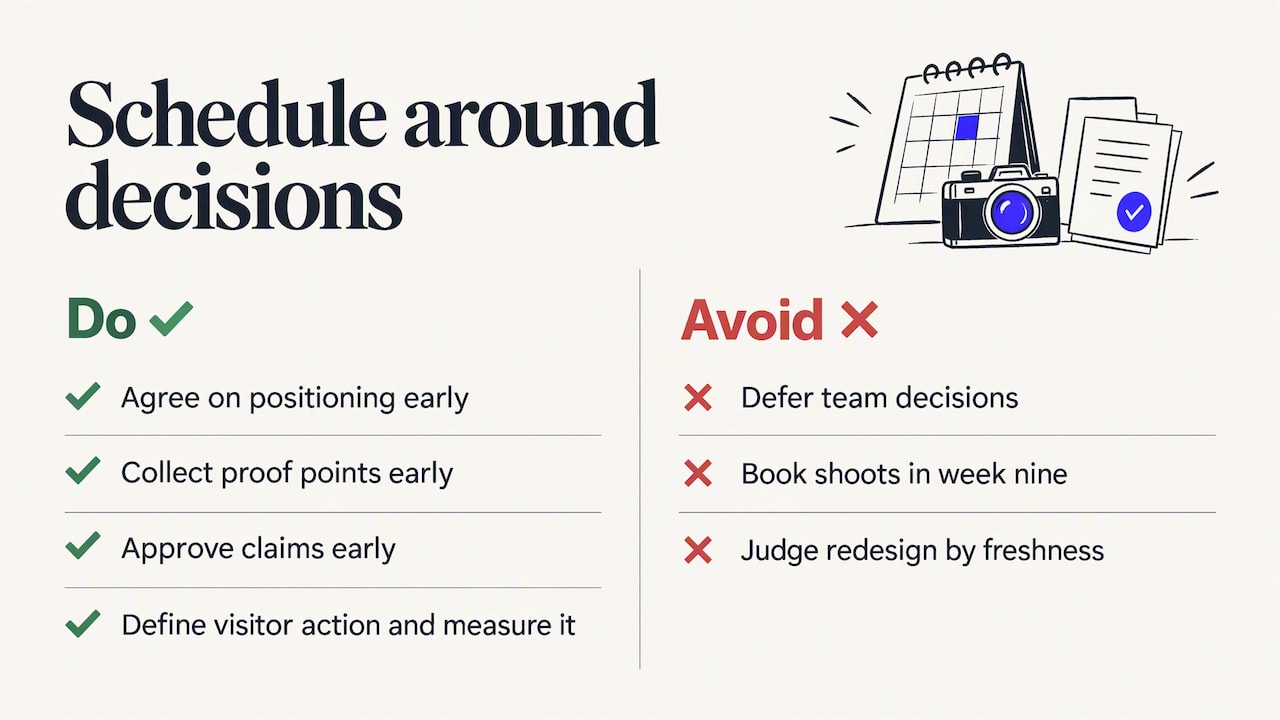
We also believe a redesign should be judged on return, not on how fresh it looks. Before the first wireframe, we want to know what a visitor should do and how you will measure it: demo requests, quote forms, event registrations. The same discipline applies to video. Our guide on how to measure video leads and prove ROI applies equally to a new site, because a homepage film that nobody can attribute to a lead is just a nice film.
Finally, we plan visual content as part of the schedule, not as a late addition. A shoot booked in week three is ready when design needs it. A shoot booked in week nine delays launch. Our case study on a redesign built to turn traffic into leads shows how that planning works in practice.
— Brandon V
How to Build a Schedule That Holds
Use this checklist at kickoff.
- Write the goal in one sentence with a number attached, such as qualified leads per month.
- Name one approver and one project lead. Share their names with everyone.
- Set content deadlines for copy, photography, video, testimonials and legal review. Tie them to the launch date.
- Fix the number of feedback rounds per phase and the turnaround time for each, such as three business days.
- Lock the page list and feature list in writing. Log new ideas for a later phase.
- Book visual production early. Photo and video shoots need scheduling, editing and approval.
- Build a redirect map from the first sitemap onward.
- Add a buffer of 10 to 20 percent for the unexpected, such as an illness, a holiday week or a delayed integration.
- Avoid launching at your busiest time. For event-driven businesses, that means launching well before a major conference or after it.
Work With a Team That Plans Content and Code Together
If your redesign depends on strong visuals, a single partner can keep the schedule tight. We handle custom website and app development, along with the photography, video, motion graphics and ad creative that fill the pages. Because one team plans the shoot calendar and the build calendar together, content arrives when designers need it. Contact V2 Visuals to talk through your goals and timeline.
FAQ
How long should a website redesign take?
For a typical small-to-mid-sized business site, plan on 8 to 16 weeks from kickoff to launch. Small sites with ready content can finish sooner, and large or e-commerce sites often take 16 to 24 weeks or more. Your own content readiness and approval speed will matter more than any average.
How often should a website be redesigned?
Many sites need a significant refresh every three to five years, though the right moment depends on your results rather than the calendar. Look for falling conversions, a changed offer, poor mobile performance or a site that is hard to update. Our article on when to redesign for growth lays out the signals in more detail.
What are the main stages of a website redesign?
Most projects move through discovery, strategy and site architecture, content creation, visual design, development, testing and QA, and launch. Post-launch monitoring follows. Phases overlap, particularly content and design.
How do I announce a website redesign?
Tell your audience about the benefit, not the new look: faster pages, easier ordering or better resources. Use email, social channels and a short note on your home page, and brief your sales and support teams before launch day. A short video walkthrough or behind-the-scenes clip also works well and can be reused across channels.
Sources
- Website Project Gantt Chart Template, NeoGantt
- Site Moves and Migrations, Google Search Central
- How the Core Web Vitals metrics thresholds were defined, web.dev
- Settlement Agreement between the United States and CVS Pharmacy, Inc., ADA.gov