

An animated logo intro is a short motion sequence, usually a few seconds long, that reveals your logo at the start of a video, presentation or event screen. The ones that work keep the logo as the hero, use one clear idea, and finish before the viewer gets restless. This guide covers what makes an intro effective, which ideas and examples are worth borrowing, and how a reveal goes from a flat logo file to a finished video your team can use everywhere.
TL;DR
- Choose one clear animation idea, such as a draw-on, a morph or a shape assembly, and let the logo stay readable at the end.
- Keep the main reveal short. Intros that run long start to feel overblown and pull attention away from the logo itself.
- Plan the intro as a small system: a full reveal, a short version for social, a looped version and a sound-designed version.
- Prepare a clean vector logo with separated layers before any animation starts, and export a version with a transparent background for editors.
- A professional team earns its fee in the planning and in matching the motion to your brand, not only in the keyframes.
Table of Contents
- What makes an animated logo intro effective
- Logo animation ideas worth borrowing
- Animated logo examples and the patterns behind them
- How long should an animated logo intro be
- How a logo reveal animation gets made
- Build a system, not just one intro
- Common mistakes to avoid
- What goes into a brief
- Our perspective
- Work with a team that plans for results
- FAQ
- Sources
What makes an animated logo intro effective
Most weak logo intros share one flaw: they try to show off the software instead of the brand. Spinning, glowing, exploding and blurring all in the same two seconds produces noise, and the viewer leaves without remembering the logo.
The intros people remember tend to do a few simple things well.
Keep the logo the hero
The viewer should recognize your mark at the end of the sequence without effort. Creative Bloq’s roundup of animated logos observes that the best examples often rely on subtle movement, and it warns that animations running too long can feel overblown and detract from the logo. If the motion hides the mark for most of the clip, simplify it.
Tell a tiny story
A good reveal has a beginning, a middle and an end, even at two or three seconds. Something appears or is drawn, the mark takes shape, and everything settles. A tiny story gives the motion a reason to exist. A trail that draws itself into a mountain peak says something. A random spin does not.
Match the motion to the brand
A law firm and a skateboard brand should not share an animation personality. Speed, easing and shape behavior carry tone. Slow, weighted easing feels premium and steady. Snappy, bouncy easing feels playful and energetic. Before you settle on an idea, write three adjectives that describe your brand and test every motion choice against them.
Use sound with purpose
Sound is half of many memorable intros. Creative Bloq points to the Intel chime as a recognizable “soundmark” and notes that sound can increase brand awareness when it accompanies a moving logo. A short sound that fits the motion, such as a soft whoosh into a clean tone, is usually enough. If you are shaping custom sound in a music or sound design workflow, a multi-effects audio plugin can help you layer and balance effects so the logo hit lands cleanly under dialogue or music.
Logo animation ideas worth borrowing
The list below groups the approaches we see most often. Each can be done in 2D or 3D, and each suits a different kind of brand.
| Idea | How it works | Best suited to |
|---|---|---|
| Draw-on | The outline of the mark traces itself, then fills | Brands with a line-based or monogram logo |
| Morph | A simple shape transforms into the logo | Tech, software and modern service brands |
| Shape assembly | Geometric pieces slide together to form the mark | Logos built from blocks or modules |
| Spell-out | Letters appear one by one, often staggered | Wordmark-led brands |
| Negative space | The mark is revealed by a wipe or cutout | Minimal, confident brands |
| Mascot action | A character moves, blinks or gestures, then returns to its original pose | Consumer, education and family brands |
| Cinematic reveal | Light, depth and camera movement bring the logo into frame | Entertainment, luxury and event brands |
These categories mirror the techniques you see across well-known brand animations: simple morphing, film-style reveals, modular shapes and mascot motion. The common thread is restraint. Each one does one thing.
Choose 2D or 3D deliberately
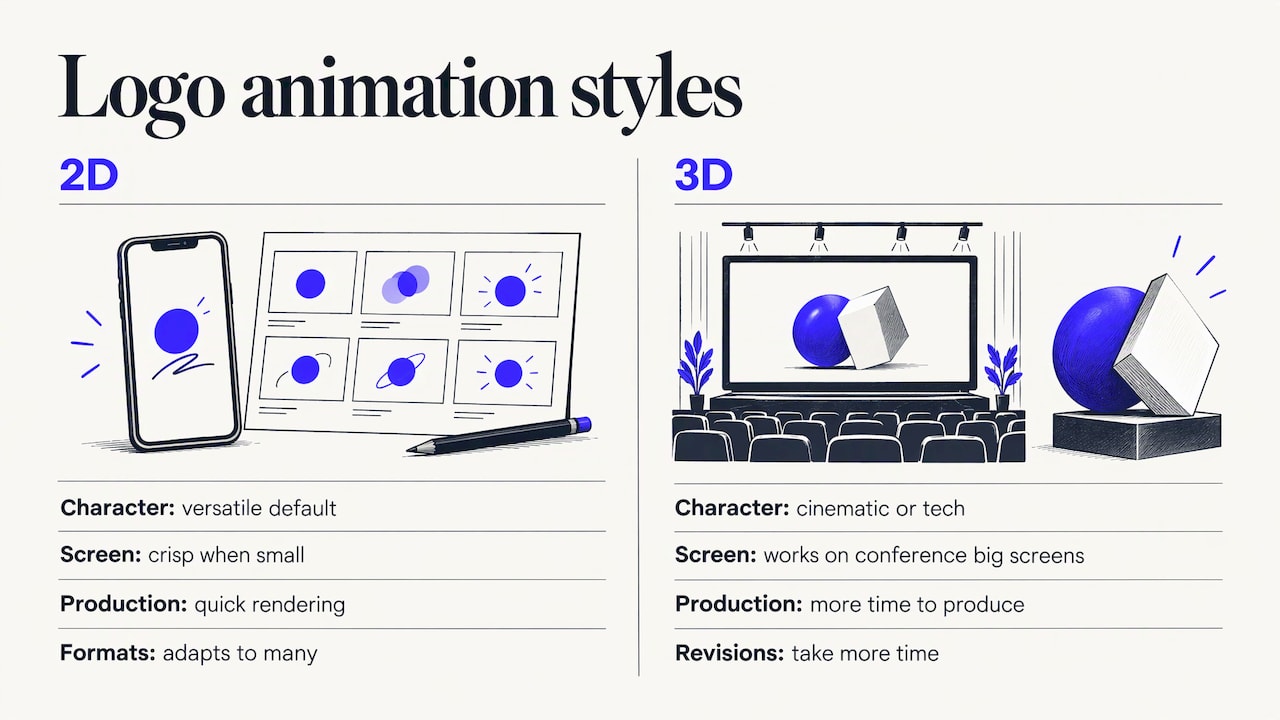
2D is the versatile default. It stays crisp on small screens, renders quickly and adapts to many formats. 3D suits cinematic or technology-driven brands and works well on a big screen at a conference, but it takes more time to produce and revise. If your logo will appear in dozens of places, start with a strong 2D system and add a 3D hero version for flagship moments. Our guide on how to choose between motion graphics and animation explains the difference in practical terms.
Animated logo examples and the patterns behind them
Instead of a gallery, it helps to study the patterns, because patterns transfer to your brand and screenshots do not.
- The calm draw. A trail or line is drawn up to complete the logo about halfway through the clip, then the finished mark holds calmly for the remainder. The hold matters: it gives the viewer time to read the brand name.
- The mascot return. A character jumps in, spreads its wings, blinks, then settles back into its original pose. Returning to the resting pose means the static logo and the animated one always match.
- The simple morph. One basic shape, often a circle or square, changes into the mark. It is fast, clean and easy to repeat across channels.
- The micro-process. The animation shows a tiny version of what the company does, such as parts assembling or a path being drawn, then lands on the logo.
When you collect examples for your own brief, save the ones you like and write one sentence on why each works. Patterns in your notes (“fast, flat, one color”) become the creative direction for your project far more reliably than a folder of clips.
How long should an animated logo intro be
Short. For the main reveal, a range of about two to five seconds covers most uses, and a good reveal often has three phases: an opening gesture that builds anticipation, the main appearance of the mark, and a closing settle. Anything much longer than five seconds needs a specific reason, such as a large event screen where the audience is waiting anyway.
Context changes the answer:
- Video intro or outro: two to four seconds, so the content starts quickly.
- Website or app loader: under two seconds, or a clean loop.
- Event screen or stage opener: longer is acceptable, because the audience is settling in and the sequence can carry music.
- Social bumper: one to two seconds, designed to work with sound off.
These are working ranges drawn from how we plan motion, not rules, and the right length for your brand is the shortest one that still lets the mark land.
How a logo reveal animation gets made
The process is the same whether you hire a team or build it in-house. Skipping the early steps is the main cause of rough results.
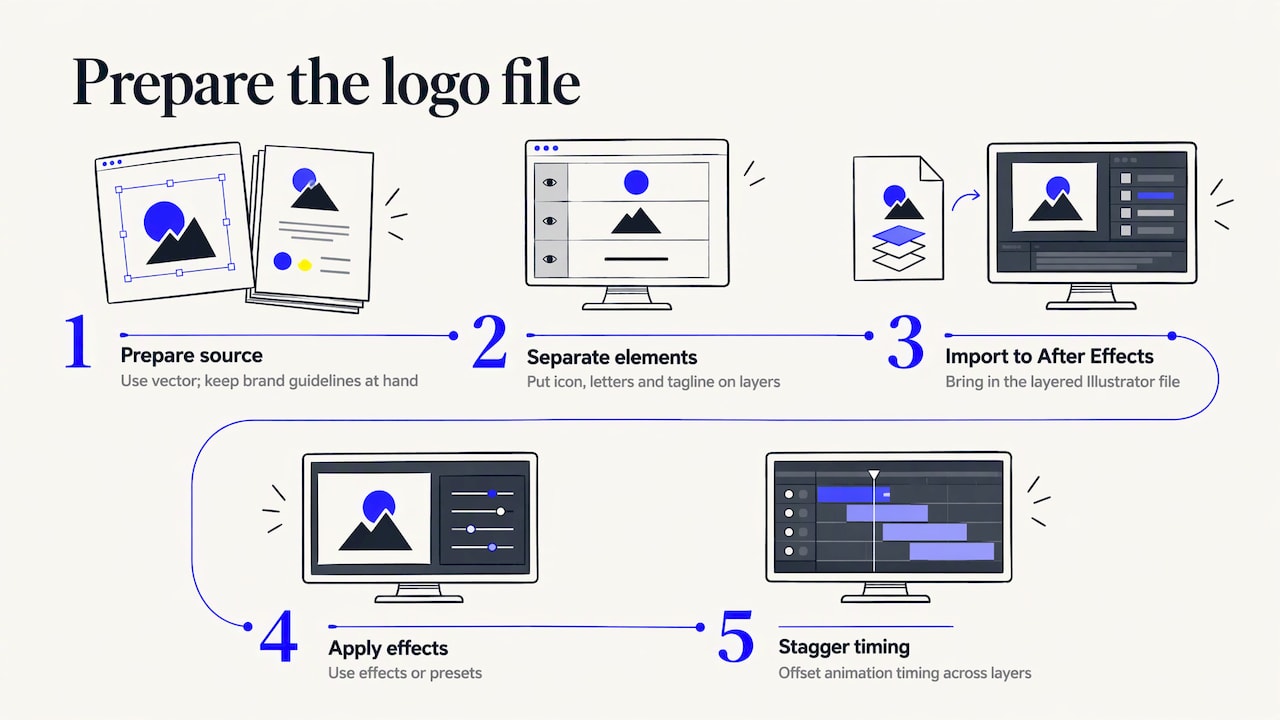
1. Prepare the logo file
Start with a vector logo, never a flattened image. Separate the elements, such as the icon, each letter and any tagline, into their own layers so each can be animated independently. Linearity’s After Effects walkthrough describes the standard route: split the vector logo into layers, import the layered Illustrator file into After Effects, apply effects or presets, and stagger the timing. Have your brand guidelines on hand too, so colors, spacing and clear space are respected.
2. Design the final frame first
The resting frame is the most important frame in the sequence, because it is the one people see longest. KinoViz’s logo reveal guide recommends designing that final state first, then working backward in time, removing opacity, scale or stroke length, so the logo lands exactly where you intend.
3. Pick one reveal method and build it
For a draw-on, the same guide explains using start and end sliders on the stroke: the end value begins at zero and rises to one hundred as the line completes, which controls how much of the outline is visible at any moment. For a shape assembly, offset each element slightly instead of moving everything at once. A stagger of a couple of frames per element creates rhythm and keeps the eye moving through the mark.
4. Refine the easing
Easing is what separates smooth from mechanical. Linear movement looks robotic. Eased movement accelerates and decelerates the way real objects do. Spend your revision time here, then check the clip at full speed and again frame by frame to catch any jitter.
5. Add sound
Lay a short sound that matches the motion. If you can, create two versions: a clean one without sound for editors and a sound-designed one for finished videos. A bold whoosh on a calm, premium brand will feel wrong, so match the audio the same way you match the motion.
6. Export for real-world use
Export from After Effects through the render queue, and think about where the file will live. If an editor will place the intro over other footage or backgrounds, ask for a render with an alpha channel (transparency). Standard H.264 MP4 files are designed for finished video, so a version with transparency generally needs a different export format. Also request a standard MP4 for easy sharing, and keep the project file so the animation can be revised when your branding changes.
Build a system, not just one intro
A single reveal covers one need. Most brands benefit from a small set of motion assets built from the same idea:
- A full logo reveal for the start of brand films and presentations.
- A short version for social bumpers and ad creative.
- A looped version for backgrounds, lobby screens and event displays.
- A sound-designed version and a clean version.
- Transitions that reuse the same shapes and easing.
Once the system exists, it can travel into paid media too. If you run video ads, a consistent opener helps viewers recognize the brand within the first second, and tracked ad campaigns, such as the approach described in this piece on platform-tracked video ad campaigns, show how measurement can follow a creative asset once it is live.
Common mistakes to avoid
- Stacking effects. Rotation, blur, particles and glow together become unreadable. Pick one idea.
- Long build-ups. If the logo does not appear until the final second, the viewer has already looked away.
- Flashing. Strobing effects are uncomfortable and can be a problem for some viewers. Keep brightness changes gentle.
- Generic templates. A stock reveal looks like every other stock reveal. Even small custom touches, such as a shape drawn from your logo, make it yours.
- Ignoring the small screen. Check the intro on a phone with the sound off before you approve it.
- No resting frame. If the animated end state differs from the static logo, your brand will appear in two versions.
What goes into a brief
Whether you work with an internal designer or an outside team, a clear brief saves rounds of revisions. Include:
- Where the intro will appear (video, event screen, web, social) and the required lengths.
- Your brand guidelines and layered vector logo files.
- Three adjectives for the brand’s personality.
- Two or three references you like, with a sentence on why.
- Sound expectations: music, a short hit or silence.
- Delivery formats, including a transparent version and your preferred aspect ratios.
Budget is a fair question to raise early, since scope drives cost. Our breakdown of logo animation cost in the US explains what shapes the price of a project so you can plan before you ask for a quote.
Our perspective
We approach an animated logo intro as a business asset, not decoration. Your logo appears at the start of every video, in front of customers, event audiences and prospects, so the few seconds it occupies should be planned like any other piece of marketing.
The strongest results start with the goal. Who sees this intro, on which screen, and what should they remember? From there we choose one idea, match the motion and sound to the brand, and build a set of versions that work across video, social and live events. Our process is designed to turn creative work into measurable results, and a consistent motion identity supports that by making every piece of content recognizable.
We also think intros should be designed alongside the videos they open. When the same team plans the brand film, the event coverage and the logo reveal, the pieces share one look, and a nationwide network of professionals means that look can be carried across cities and productions.
Brandon V
Work with a team that plans for results
If you would like an animated logo intro that fits your brand and the videos it will open, V2 Visuals can help. Our motion graphics and animation services cover custom animation, and our video production team can build the intro together with corporate, marketing or branding videos so everything shares one look.

To discuss your project, reach out through V2 Visuals with where the intro will run and the formats you need. You can also read about corporate video formats that support growth to see where a logo intro fits in your wider video plan.
FAQ
What is the difference between a logo intro and a logo reveal?
The terms overlap. A logo intro is the animation that opens a video or presentation, and a logo reveal is the motion that brings the logo into view. Most teams build one reveal and then adapt it into intros, outros, bumpers and loops.
How long should an animated logo intro be?
For most videos, two to four seconds is a good target, and a few more is reasonable for event screens. Loaders and social bumpers should be shorter. Long intros risk feeling overblown and drawing attention away from the logo.
Can I animate a logo myself?
Yes, if you have a layered vector file and are comfortable with motion software. The steps above show the standard workflow. Businesses that need a polished result, matched sound and several formats often bring in a production team so the intro fits the rest of their video content.
What files do I need to provide?
Supply a vector logo, ideally in layered form, along with your brand guidelines covering colors, fonts and clear space. If you have approved sound or music, include it. Ask for final deliverables in a standard video format plus a version with a transparent background.
Should the intro include sound?
Usually yes, as a short sound that fits the motion, with a clean silent version available for editors. Sound can strengthen recognition when it accompanies a moving logo, as the Intel chime shows. Keep it brief and in keeping with your brand’s personality.
Sources
- 10 of the best animated logos, Creative Bloq
- How to animate a logo in After Effects, Linearity
- How to Make a Logo Reveal Animation, KinoViz