



A typical business video moves through five phases: planning, pre-production, production, post-production and distribution. For a standard marketing or corporate piece, a workable plan is about four to eight weeks from kickoff to final delivery. Simple single-location shoots can run shorter, and animation, multiple locations or many stakeholders run longer. The number that matters most is not the shoot day. It is how quickly your team approves scripts, schedules and cuts.
This guide breaks the timeline into phases, gives planning ranges for each, shows how to build a production schedule with owners and approvals, and explains what stretches or shortens a project.
TL;DR
- Video projects follow five phases: planning, pre-production, production, post-production and distribution.
- As a planning range, expect roughly four to eight weeks for a standard business video. Complex or multi-location work takes longer.
- Most of the calendar is pre-production and post-production. The shoot itself is often one to a few days.
- Delays usually come from slow approvals, so name one approver and one feedback channel before kickoff.
- Build the schedule backward from your launch or event date, and add a buffer for review rounds.
Table of Contents
- The five phases of a video production timeline
- How long each phase takes
- How to build a video production schedule
- What makes a timeline longer or shorter
- How to keep reviews and revisions from delaying delivery
- Timeline examples by video type
- Our perspective on production timelines
- Plan your video with V2 Visuals
- FAQ
- Sources
The five phases of a video production timeline
Most production guides use the same backbone. Storyblocks lays out five phases: planning, pre-production, production, post-production and distribution. Ziflow describes the same flow end to end, from idea and script through storyboarding, casting and location scouting, filming, editing, color grading and sound design, then exporting, platform delivery and archiving.
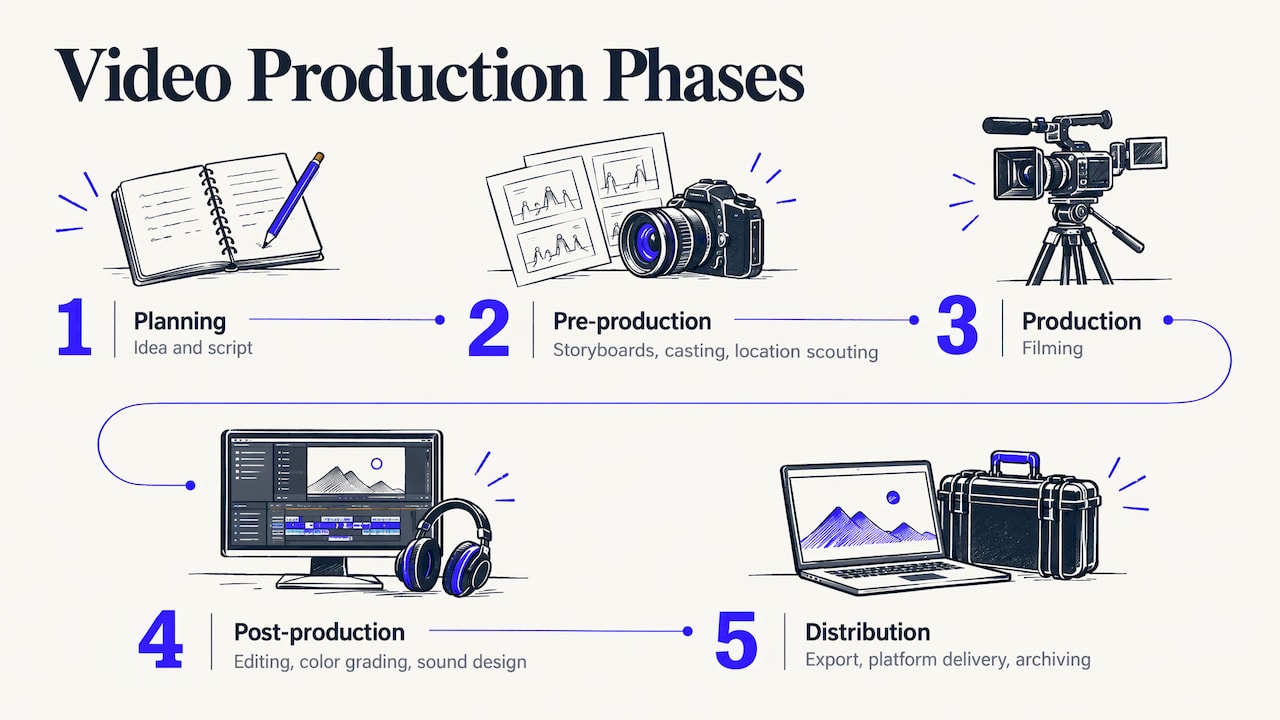
The names vary between companies. Some fold planning into pre-production and call it three phases. The work underneath is the same, and so is the order: decisions get more expensive to change with every phase you move through.
How long each phase takes
The ranges below are planning figures for a standard corporate or marketing video with one to two shoot days. They are not a guarantee for any specific project. Your brief, number of locations and approval process move them in either direction.
| Phase | What happens | Typical planning range |
|---|---|---|
| Planning and strategy | Goals, audience, message, budget, distribution plan | A few days to 1 week |
| Creative development | Concept, script or interview outline, treatment | About 1 week |
| Pre-production | Shot list, storyboard, casting, locations, crew, permits, call sheets | 1 to 2 weeks |
| Production | Filming, interviews, b-roll, audio capture | 1 to 3 days for most projects |
| Post-production | Editing, graphics, color, sound mix, review rounds | 2 to 4 weeks |
| Distribution | Final exports, captions, uploads, scheduling | A few days |
Add those up and you land in the four-to-eight-week range. A rush is possible, but it compresses review time, and that tends to show in the final cut.
Planning and creative development
This is where the project is won or lost. You define who the video is for, what a viewer should do afterward, where it will run and how you will measure it. A video built for a trade show booth loop needs different pacing, length and file specs than one built for a landing page or a paid social campaign.
By the end of this phase you should have a written brief, a budget range, a target delivery date and a named approver. If you are weighing formats, our guide to the best corporate video formats can help you match a format to a goal before the script is written.
Pre-production
Pre-production is the longest stretch of real preparation and the one clients most often underestimate. It covers the script, shot list, storyboards, casting, location scouting, crew booking, equipment, releases and call sheets.
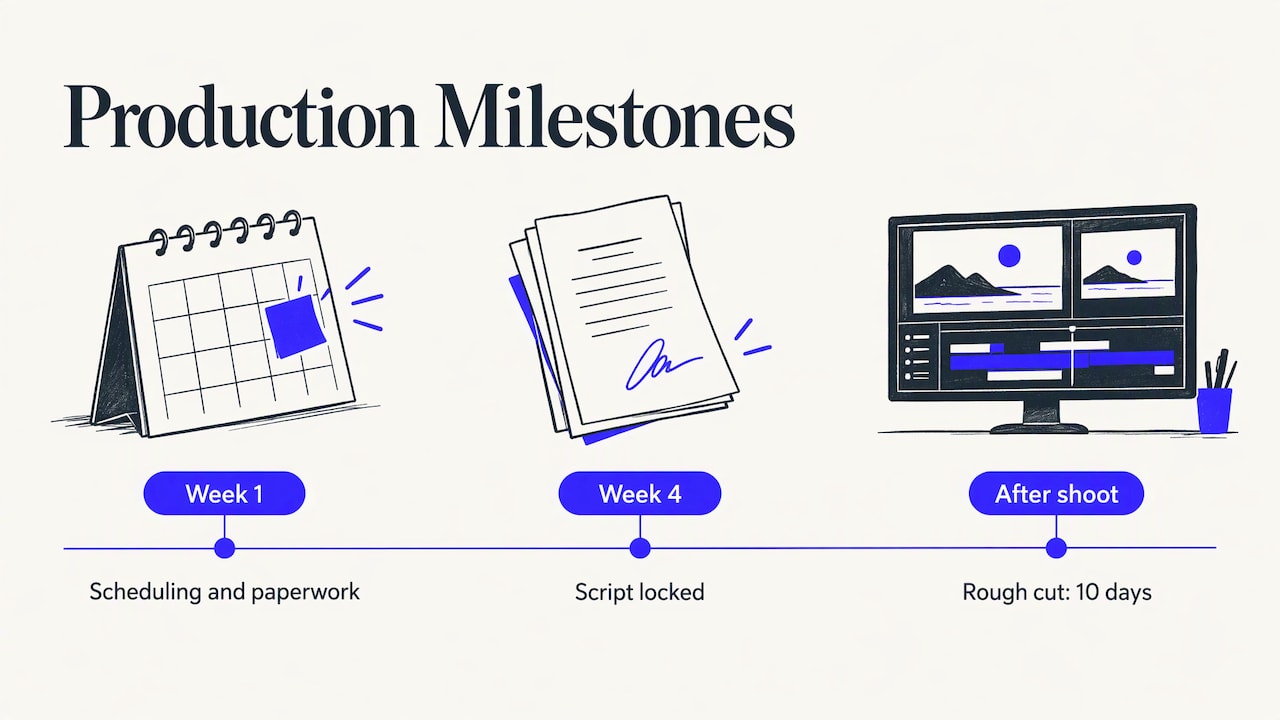
The tasks depend on each other. You cannot build an accurate shot list before the script is locked, and you cannot lock a shoot date until talent, location and crew are all available. A useful academic example is the Loyola Marymount University production timeline worksheet, which sets a scheduling meeting and paperwork in week 1, a locked script in week 4, and a rough cut due 10 days after the shoot. Film school projects run on their own pace, but the sequence is the same one a business project follows.
Before the shoot day, the final check should confirm the plan the crew will use and resolve anything still marked TBD that could block the day. CinePlan’s checklist says call sheets should carry call times, addresses, parking, contacts, weather context and safety notes.
Production
The shoot is the shortest phase and the most visible. Interviews, b-roll, product shots, event coverage or a scripted scene can often be captured in one to three days. Larger productions with several locations, talent and set builds run longer.
What shortens a shoot day: a locked shot list, a prepared interview subject, a location with controlled sound and light, and a single point of contact on site. What lengthens it: last-minute guests, unscheduled location changes and unclear approvals on set.
If your project is a live event, the timeline looks different because the shoot date is fixed and everything else works backward from it. Our breakdown of what a commercial production timeline really takes covers how larger commercial shoots are paced.
Post-production
Editing is where raw footage becomes a finished piece, and it usually takes two to four weeks for a standard business video. That window includes the assembly, a rough cut, graphics or motion work, color grading, sound design and mix, plus your review rounds.
Post-production should not have to reverse-engineer what happened on set. CinePlan says a good handoff includes organized media, camera and sound reports, continuity notes, releases and licenses, edit specifications, review rounds, approval owners, delivery formats, captions and final deadlines. Clean handoff saves days.
For event footage specifically, turnaround depends on the deliverable. A same-week highlight reel and a full recap film are different jobs, and we explain the difference in our guide to how long event video editing takes. If you need motion graphics or animation layered into the edit, plan extra time for the design and approval of those elements. Our comparison of motion graphics vs. animation helps you scope that early.
Distribution
A finished file is not a finished project. Distribution includes exports for each platform, captions, thumbnails, landing page embeds, email and social scheduling, and archiving of project files. Build a few days for it, and schedule it before the final cut is approved so nothing waits on a person who is traveling.
Vertical cuts for social channels are worth planning at the start, since they affect framing on the shoot day. These vertical video ideas show what short-form formats look like in practice, and our corporate video distribution strategy guide covers how to get a finished video in front of the right audience. If you filmed an event, repurposing event footage can extend the value of the shoot across several weeks of content.
How to build a video production schedule
A timeline tells you roughly how long things take. A schedule assigns dates and people. TeamGantt describes a video production schedule as a high-level plan showing how production tracks over time, so cast, crew, props and equipment are in the right place at the right time and major deadlines do not slip.
Here is a process that works for most business projects.
- Start with the fixed date. This is your launch, conference, product release or campaign start. Everything counts backward from it.
- List the phases and the tasks in each. Include approvals as tasks, not afterthoughts. “Client approves script” is a line item with a date.
- Set dependencies. Script before shot list. Location confirmation before call sheet. Picture lock before color and final mix.
- Mark milestones. TeamGantt recommends using milestones to flag key dates, deadlines, approvals and deliverables, and assigning every task to a specific owner.
- Add buffer. Put extra days before the fixed date, especially around review rounds and anything outdoors.
- Update progress weekly. A schedule nobody updates is a document, not a plan.
A Gantt chart is the most common way to see all of this at once, and project management software makes dependencies easy to track. If your team already plans projects with a defined sequence, the logic is similar to a website design timeline: phases, dependencies and approvals set the length of the project more than the work itself.
A sample eight-week schedule
This is a template for a marketing video with two shoot days. Adjust it to your project.
| Week | Milestone | Owner |
|---|---|---|
| 1 | Kickoff call, brief signed off, goals and audience confirmed | Marketing lead and producer |
| 2 | Script or interview outline approved | Approver and creative director |
| 3 | Shot list, locations, talent and crew confirmed | Producer |
| 4 | Call sheets sent, final pre-shoot check | Producer |
| 4 or 5 | Shoot days | Director and crew |
| 5 to 6 | Rough cut delivered, first consolidated feedback | Editor, then approver |
| 6 to 7 | Second cut with graphics, color and sound | Editor |
| 7 | Final approval and exports | Approver |
| 8 | Distribution and archiving | Marketing team |
That is a calm schedule. If your date is tighter, the first things to compress are the planning stage and the number of review rounds, not the shoot prep.
What makes a timeline longer or shorter
The same video can take three weeks or three months depending on a handful of variables.
- Length and complexity. A 60-second testimonial and a five-minute brand film with animation are different jobs.
- Number of shoot days and locations. Travel, setup and company moves add time.
- Scripting. If you arrive with a script, you save a week. If the message is still being debated internally, that debate happens on the production clock.
- Talent and location availability. Executives and customers have calendars. Book them early.
- Graphics, animation and sound. Custom motion work adds design and review loops.
- Review and approval. More stakeholders mean more rounds.
- External constraints. Rigid delivery dates, permits, seasonal light and weather.
The International Documentary Association makes the same point for long-form film. Its budgeting and scheduling guide says schedule assumptions should account for the film’s length, the number of shoot days and the time they span, the expected edit period, time for color grading and sound mix, and any external constraints or rigid delivery date. It also recommends a generous schedule buffer for uncertainties. Business videos are smaller, but the planning questions are the same.
How to keep reviews and revisions from delaying delivery
If you want to shorten a timeline without cutting quality, work on approvals. That is where weeks disappear.
Krock.io says most revision chaos starts when review is treated as a vague request to “get feedback.” It recommends an internal review first, then client review through a single feedback channel. Fastio recommends tools that allow time-stamped comments directly on the video, which removes ambiguity from notes like “make it pop more.”
Put that into practice with these habits:
- Name one approver. Collect feedback from everyone, but one person consolidates it and signs off.
- Agree on rounds up front. Two review rounds is a common plan. Decide what each round covers: structure first, then polish.
- Use time-coded notes. “At 0:42, replace the second clip” beats “the middle feels slow.”
- Set response windows. Put feedback deadlines on the schedule, such as two business days after each cut.
- Lock the script before the shoot. Changes after filming cost far more than changes on paper.
- Check legal and brand sign-offs early. Compliance, brand guidelines and talent releases should not appear for the first time at final review.
Timeline examples by video type
Use these as starting points when you scope a project.
- Customer testimonial or talking-head interview. Often the quickest, since there is one location and little graphic work. Planning ranges are shorter than a standard brand film.
- Corporate brand film or marketing video. The four-to-eight-week range above applies, with more time if there are several locations or custom animation.
- Event video. The date is fixed. Pre-production focuses on a shot list, access and run of show. Deliverables such as same-day highlights and the full recap are scheduled separately. See what to expect from a corporate event video package and how to plan conference video.
- Recruitment video. Interviews with employees and workplace b-roll make scheduling around staff calendars the main variable. See our page on recruitment video production.
- Animated or motion graphics video. Add design, storyboard approval and animation rounds. Our creative motion graphics animation services page explains the process.
Our perspective on production timelines
Most clients ask us how long the shoot will take. The better question is how long it will take to get everyone aligned before and after the shoot.
We build projects around business outcomes. That means we start with the goal and the date your video has to work by, then plan backward. A video that arrives after the campaign launch or the conference has already lost much of its value, however good it looks.
With a network of professionals across the nation, we can staff crews in the cities where your event or shoot happens, which keeps travel from becoming a hidden schedule risk. Our approach puts the approvals on the calendar from day one: who signs off on the script, who consolidates feedback, and when each cut is due.
If you are unsure how long your project will take, bring us the date and the goal. We will tell you what fits, and how to make the plan hold.
Brandon V
Plan your video with V2 Visuals
If you have a launch date, a conference or a campaign in mind, the fastest way to get a realistic schedule is to talk through the brief with a production team. V2 Visuals produces corporate, marketing and brand storytelling videos, along with event videography, photography, motion graphics and ad creative for businesses and marketing teams across the United States. Share your goal and your date, and we will map the phases, owners and approvals with you.

Ready to start? Visit V2 Visuals to request a conversation about your project.
FAQ
How long does a video production timeline usually take?
For a standard business or marketing video, plan on roughly four to eight weeks from kickoff to final delivery. Simple single-location projects can be faster. Multi-location shoots, custom animation and large approval groups take longer. The shoot itself is often only one to three days of that.
Which phase takes the longest?
Post-production and pre-production take the most calendar time. Editing, graphics, sound and review rounds typically run two to four weeks, and pre-production runs one to two weeks. Production is usually the shortest phase, but everything depends on it being prepared well.
Can a video be produced faster than usual?
Sometimes, yes. A rush schedule is possible when the script is ready, talent and locations are confirmed and one person approves each cut. The trade-off is less review time, so reduce scope or the number of revisions rather than skipping preparation.
What should a video production schedule include?
A schedule should list phases, tasks, dependencies, milestones, owners and approval dates. Include shoot days, call times, deliverable formats and final deadlines. Update it weekly, so everyone sees where the project stands.
When should I start planning a video for an event or launch?
Start as soon as the date is fixed. For a standard project, begin at least eight weeks before you need the final video, and earlier if you need animation, multiple locations or several rounds of stakeholder review.
Sources
- Storyblocks: The complete video production timeline
- Ziflow: Video production workflow
- Loyola Marymount University: Complete production timeline worksheet
- CinePlan: Film production checklist
- TeamGantt: Video production schedule templates
- International Documentary Association: Documentary budgeting and scheduling
- Krock.io: Video production workflow
- Fastio: Video project management
- Presly: Vertical video ideas
- Blue Lake Web Design: Website design timeline
Pingback: Video Production RFP: How to Write One That Works