



A web design brief is a short written document that tells a designer or agency why your website exists, who it serves, what it must do, what is in scope, what it should cost and when it must launch. Write it before you ask anyone for a quote. A good one fits on three to six pages, names one measurable goal, and is specific enough that two different people would read it and commit to the same scope.
This guide walks through each section, shows what a filled-in example looks like, explains when you need a formal RFP instead, and lists the mistakes that cause the most rework.
TL;DR
- A web design brief covers business context, goals, audience, scope, design direction, content, technical needs, budget, timeline and who signs off.
- Lead with one primary goal that has a number attached, such as demo requests per month, rather than “a modern look.”
- Separate must-have pages and features from nice-to-haves so quotes are comparable.
- Use a brief for most projects. Move to an RFP when procurement rules or a large multi-stakeholder budget require documented vendor selection.
- Name one decision-maker and one date for content delivery. Both are common causes of delay.
Table of Contents
- What a web design brief is and why it matters
- Web design brief vs. creative brief vs. RFP
- The sections every web design brief needs
- What a filled-in brief looks like
- When you need an RFP instead
- Questions to ask yourself before you send the brief
- Common mistakes in web design briefs
- Our perspective: the brief should include the visuals
- Plan your website visuals with V2 Visuals
- FAQ
- Sources
What a web design brief is and why it matters
A brief is the bridge between what your business needs and what a designer builds. Shopify’s partner guide describes a design brief as a project management document that sets the scope, scale and core details of a project, similar to a proposal or statement of work, with the difference that the client has already decided to work with you.
In practice it does three jobs:
- It forces internal alignment. Marketing, sales and leadership often want different things from the site. Writing it down surfaces the disagreement before it costs money.
- It makes quotes comparable. When every agency answers the same scope, you compare approach and price, not guesses.
- It protects the schedule. When someone says “can we just add one more page” in week four, the brief is the document you point to.
At V2 Visuals we produce video, photography and branding for businesses, and we see the same pattern on every project type: the clearer the brief, the less time goes to rework. Our video production brief guide makes the same case for film. The principles carry over to websites almost unchanged.
Web design brief vs. creative brief vs. RFP
These three documents get mixed up, and the search results blend them. Here is the practical difference.
| Document | Purpose | Typical reader | Best for |
|---|---|---|---|
| Creative brief | Sets strategy: goals, key messages, tone, audience | Marketing and creative team | Aligning on the story before design starts |
| Web design brief | Turns strategy into scope, visual and technical requirements, budget, timeline | Designer, developer, agency | Most website builds and redesigns |
| RFP | Formal request that invites competing proposals scored on set criteria | Several vendors, procurement staff | Large budgets, public bodies, formal vendor selection |
Figma’s guide to creative briefs explains that a creative brief sets the strategic foundation and a design brief builds on it with specific technical and visual requirements. Dovetail makes a similar split: the creative brief covers the project as a whole, including goals and key messaging, while the design brief lays out visual elements.
If you are a small or mid-sized team, one combined document usually works. Put the strategy in the first half and the requirements in the second.
The sections every web design brief needs
Here is the structure we recommend. Each section includes what to write and what to avoid.
1. Company background and the reason for the project
State what you sell, who buys it, and what changed. A new product line, a rebrand, a merger, a site that no longer converts: the trigger shapes the whole project. Two or three short paragraphs are enough.
Include your current site address, the platform it runs on, what works, what does not, and a few analytics numbers such as monthly sessions, conversion rate and top landing pages. Designers cannot improve what they cannot see.
2. Goals and success metrics
This is the section that separates a useful brief from a wish list. Pick one primary goal and two secondary goals, each with a number and a timeframe.
- Weak: “We want more leads.”
- Strong: “Raise qualified demo requests from 18 to 45 per month within six months of launch.”
- Strong secondary: “Cut support email volume by publishing a self-service help center.”
If you can only measure one thing, measure the action that produces revenue. Everything else in the brief should trace back to it.
3. Target audience
Describe two or three segments, not a demographic spread. For each, give a job title or role, the problem they arrive with, and the action you want them to take. For a B2B site that might be a marketing director comparing vendors, a procurement lead checking credentials, and an event planner who needs a fast quote.
One specific sentence per segment beats a page of personas nobody reads.
4. Scope: pages, features and content
List what is in and what is out. Use three lists:
- Must-have: pages and features the launch cannot happen without (home, services, contact form, case studies).
- Nice-to-have: items you would add if time and budget allow (resource library, gated downloads).
- Out of scope: anything you want to explicitly exclude for now (a client portal, multilingual versions).
A rough sitemap, even a bulleted outline, helps an agency estimate far more accurately than a paragraph of description.
5. Design direction
Attach your brand guidelines, logo files, fonts and colors. If you do not have them, say so, because that changes the scope. Then add three reference websites and a sentence on what you like about each (the navigation, the photography, the way case studies are laid out). Add two or three sites you do not want to resemble, and explain why.
Avoid vague adjectives like “clean” and “modern.” Every designer believes their work is both.
6. Content: who writes it, and when
Content is the most common reason sites launch late. State what already exists, what needs writing, who writes it, and by what date it will reach the designer. Mention photography and video too. Custom visuals often make the difference between a template-looking site and one that reflects your brand, and they take scheduling. Our team handles corporate photography and marketing photography and corporate video production, so we ask about these early so assets are ready when the layout is.
7. Technical requirements
Cover platform preference (WordPress, Shopify, custom), integrations (CRM, email, scheduling, analytics), hosting constraints, accessibility level, performance expectations and any migration needs such as keeping URLs and search rankings. If you are unsure, say what the site must connect to and let the agency recommend.
For accessibility, name the standard you want to meet, for example WCAG 2.1 AA, and ask the agency to confirm it in their proposal. If your organization has legal or compliance staff, ask them what applies to you.
8. Budget and timeline
Give a range, not a secret. Agencies price differently depending on whether you are at the low or high end of what you can spend, and a range lets them propose the right level of solution. For current market context on what projects cost, this overview of web redesign costs for small businesses is a helpful reference point.
For the schedule, give a target launch date and any fixed constraints such as a trade show or product release. Our own breakdown of website redesign phases, weeks and delays shows how long each stage tends to take and where projects slip.
9. Decision process and contacts
Name who reviews, who approves, and who has the final word. State how many rounds of feedback you expect. Projects stall when feedback arrives from six people in six directions. One consolidated set of comments per round keeps the timeline intact.
What a filled-in brief looks like
Below is a condensed example for a fictional B2B software company. Use it as a pattern, not as text to copy.
Company and context: We sell freight tracking software to mid-sized logistics firms. We launched a new analytics module this quarter and the current site does not mention it.
Current site: WordPress, five years old. About 8,000 monthly sessions, 0.6% conversion to demo request, most traffic landing on the blog.
Primary goal: Raise qualified demo requests from 18 to 45 per month within six months of launch.
Secondary goals: Reduce support emails with a self-service help center. Rank for our core product term.
Audience: (1) Operations director comparing platforms, wants proof of integrations. (2) IT lead checking security and API access. (3) Finance approver who needs pricing context.
Scope: Must-have: home, product, analytics module, integrations, pricing overview, case studies, demo request, help center. Nice-to-have: ROI calculator. Out of scope: customer login portal.
Design: Existing logo and brand colors attached. References: three sites with notes. Anti-references: two sites with notes.
Content: Product pages exist and need updating. Case studies need two new interviews. Marketing delivers all copy by week four. Product video and team photography to be commissioned.

Technical: Stay on WordPress, integrate with our CRM and scheduling tool, keep existing URLs or provide redirects, meet WCAG 2.1 AA.
Budget and timeline: Stated range, launch before our annual conference, sign-off by the VP of Marketing.
Notice what the example does. Every section is short, every goal is measurable, and anything that could be disputed later has an owner or a date.
When you need an RFP instead
Most small and mid-sized projects do not need one. A formal request for proposals makes sense when procurement rules require documented vendor selection, when the organization is large with a formal buying process, when the budget is substantial, or when many stakeholders need written justification for the choice. One agency guide puts the threshold for complex projects at roughly $20,000 and above, though that is a rule of thumb rather than a rule.
An RFP contains everything the brief does, plus evaluation criteria and submission rules. Add these questions to your brief to turn it into one:
- How will you approach our goals, and what is your process from kickoff to launch?
- Which team members will work on the project, and what is their experience?
- Can you share relevant work and references?
- What is your timeline, and what do you need from us to hold it?
- How do you handle revisions, change requests and scope changes?
- What does post-launch support include, and what does it cost?
- How will you measure whether the site met its goals?
Publish the scoring criteria with the document so vendors know what you value.
Questions to ask yourself before you send the brief
Before the brief goes out, run it through these checks. Many of them mirror what a good discovery conversation would surface, and this list of website discovery questions is a useful companion for the stakeholder conversations.
- Could a stranger state our primary goal in one sentence after reading page one?
- Does every must-have item connect to a goal?
- Have we said who writes the content and when it arrives?
- Have we named a single approver?
- Is the budget range stated?
- Are brand assets attached?
- Would two agencies quote the same scope from this document?
If you answer no to any of them, fix it before sending. It takes less time than a week of clarifying emails.
Common mistakes in web design briefs
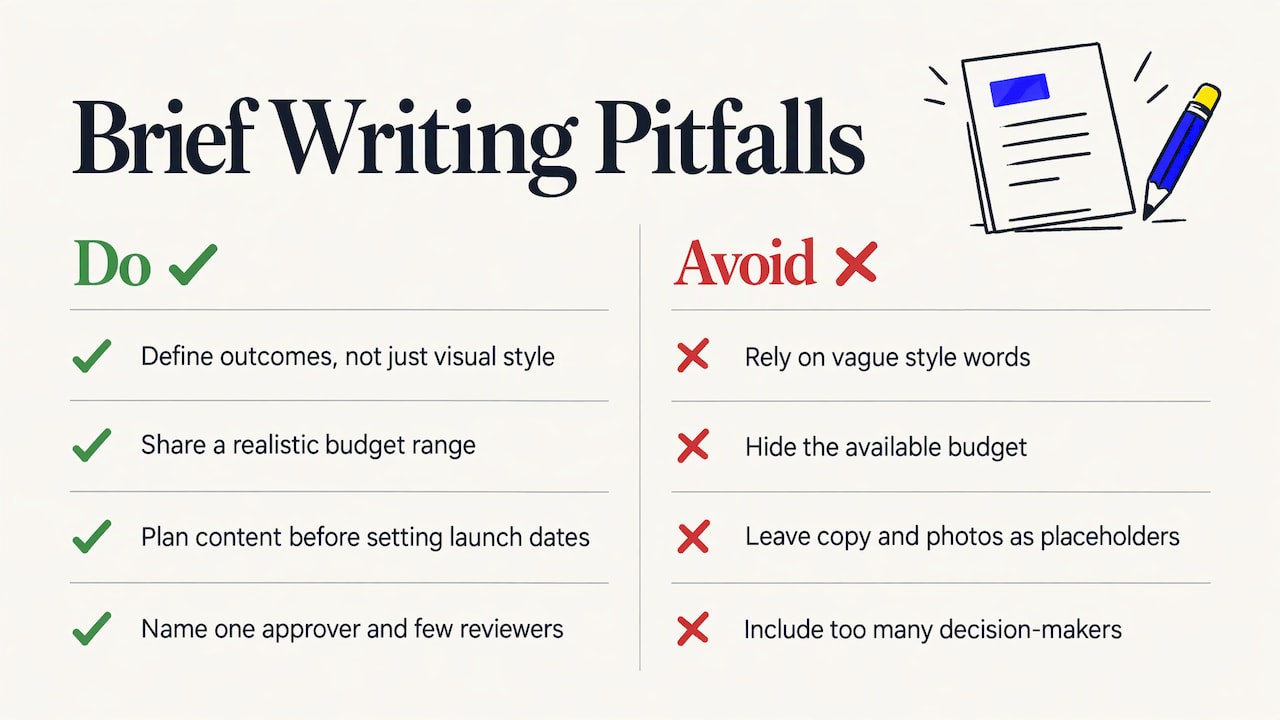
Describing the look instead of the outcome. “Sleek and professional” gives a designer nothing to test against. “Help a procurement lead find credentials and a contact form in two clicks” does.
Hiding the budget. Without a range, proposals come back across a wide spread and are hard to compare.
Skipping content planning. Placeholder copy and missing photos are the top reasons launch dates move.
Too many decision-makers. Name one approver and a short list of reviewers.
Forgetting what happens after launch. Ask who handles hosting, security updates, edits and reporting, and put it in the brief.
Treating the brief as fixed. Update it when decisions change and share the revised version, so everyone works from the same document.
Our perspective: the brief should include the visuals
We build video, photography and branding for businesses, and we have a consistent view: a website is only as persuasive as the assets on it. Teams often write a careful brief for layout and features, then leave imagery to the last week. The result is a well-organized site filled with stock photos.
Our approach is to filter creative work through business outcomes. For a website brief, that means asking early what the visitor needs to see to trust you: a short brand film on the home page, customer testimonials on the services page, real headshots of the people they will work with. Those decisions affect scope, schedule and budget, so they belong in the brief.
Our network of professional crews across the country lets us schedule shoots around a launch date rather than the other way around. If you plan the visual assets while you write the brief, the designer receives content that fits the layout, and you avoid rework when the photography arrives late and in the wrong proportions.
Brandon V
Plan your website visuals with V2 Visuals
If your brief includes brand video, team photography or product imagery, we can help you scope it alongside the design work. We produce corporate and marketing video, corporate and marketing photography, and custom website and app development, with an emphasis on measurable return.

Tell us your launch date and goals, and we will help you work out which assets the site needs. Start at v2visuals.com and request a conversation about your project.
FAQ
How long should a web design brief be?
Three to six pages covers most projects. Large or complex builds can run longer, but every section should earn its place. If a reader cannot summarize your goals after the first page, the brief needs tightening.
Should I include my budget in the brief?
Yes, as a range. A stated range helps an agency propose a solution that fits, rather than guess, and it makes quotes easier to compare. You do not need to give a single figure, and you can ask the agency what they would deliver at the low and high end.
What is the difference between a website brief and a website RFP?
A brief describes the project so a chosen or shortlisted agency can scope it. An RFP adds vendor questions, evaluation criteria and submission rules so several agencies can compete formally. Use a brief for most projects and an RFP when procurement policy or a large, multi-stakeholder budget calls for it.
Who should write the web design brief?
The person who owns the website goals, usually a marketing lead or business owner, should write it after talking to sales, leadership and anyone who maintains the site. One owner keeps the document consistent, while input from other teams keeps it realistic.
Can I use a template?
Yes. Use the nine sections above as your template and replace every placeholder with specifics. A template saves time only if you fill it with real numbers, real pages and real dates.
Sources
- What is a Design Brief and How to Write One (Shopify Partners)
- How to Write a Creative Brief in 5 Steps (Figma)
- How to Create an Effective Design Brief (Dovetail)
- Website Discovery Questions to Ask Before You Build