



A sales enablement video is a short, purpose-built video that helps a rep or a buyer complete one specific step in a deal: preparing for a call, understanding a workflow, hearing an objection answered, or forwarding an explanation to a colleague. The videos that earn their cost are planned around a stalled moment in your sales process and produced well enough that reps are proud to send them. We work with marketing teams and sales leaders on exactly this kind of footage, and this guide covers the types, the examples worth studying, the planning and the measurement.
TL;DR
- Build each video to solve one blocked moment in your pipeline, not to add to a content library.
- Match the type and length to the deal stage: 30 to 90 seconds for outreach and follow-up, two to four minutes for demos.
- Personalized, short video emails have produced strong response numbers in published sales team case studies.
- Audio, lighting and a clean script decide whether reps trust a video enough to send it.
- Measure plays and completion separately from opportunities moved, and track how often reps reuse each asset.
Table of Contents
- What a sales enablement video actually is
- Start with the stalled conversation
- Types of sales enablement video by deal stage
- Sales video examples worth learning from
- How to plan and script one
- Where production quality pays off
- Getting reps to send the videos
- Measuring whether it works
- A realistic first project
- Work with V2 Visuals
- Our perspective
- FAQ
- Sources
What a sales enablement video actually is
The phrase covers two audiences. Some videos are buyer-facing: a demo leave-behind, a customer story, a pricing explanation. Others are rep-facing: onboarding, product training, messaging reinforcement. Both share one trait: they exist to support a selling task and tell the viewer what to do next.
That separates them from a brand film. A brand film builds awareness and emotion over a broad audience. A sales enablement video is judged by whether it moves a particular conversation forward. If a buyer cannot say what they should do after watching, the video has failed, however good it looks.
For a buying committee, the video also travels. Your champion forwards it to a finance lead or an operations manager who never met your team. It has to make sense on its own, which means one clear question answered, a descriptive title, and a scope that does not overpromise.
Start with the stalled conversation
The most useful planning question is not “should we make more video?” It is: which conversation keeps slowing our deals down? Ask your sales team to list the five moments where deals stall or reps repeat the same explanation. Typical answers include:
- Prospects who go quiet after a demo.
- The same pricing or ROI objection raised in late stages.
- Procurement or legal asking for proof from a similar customer.
- New reps taking months to explain the product well.
- Champions who cannot explain your product to their own boss.
Each of those is a candidate for one video. Rank them by how many deals they touch and how often reps already explain them verbally. A video that replaces a weekly repeated explanation pays back quickly. Our own B2B video strategy plan uses the same logic: pick the business problem first, then the format.
Types of sales enablement video by deal stage
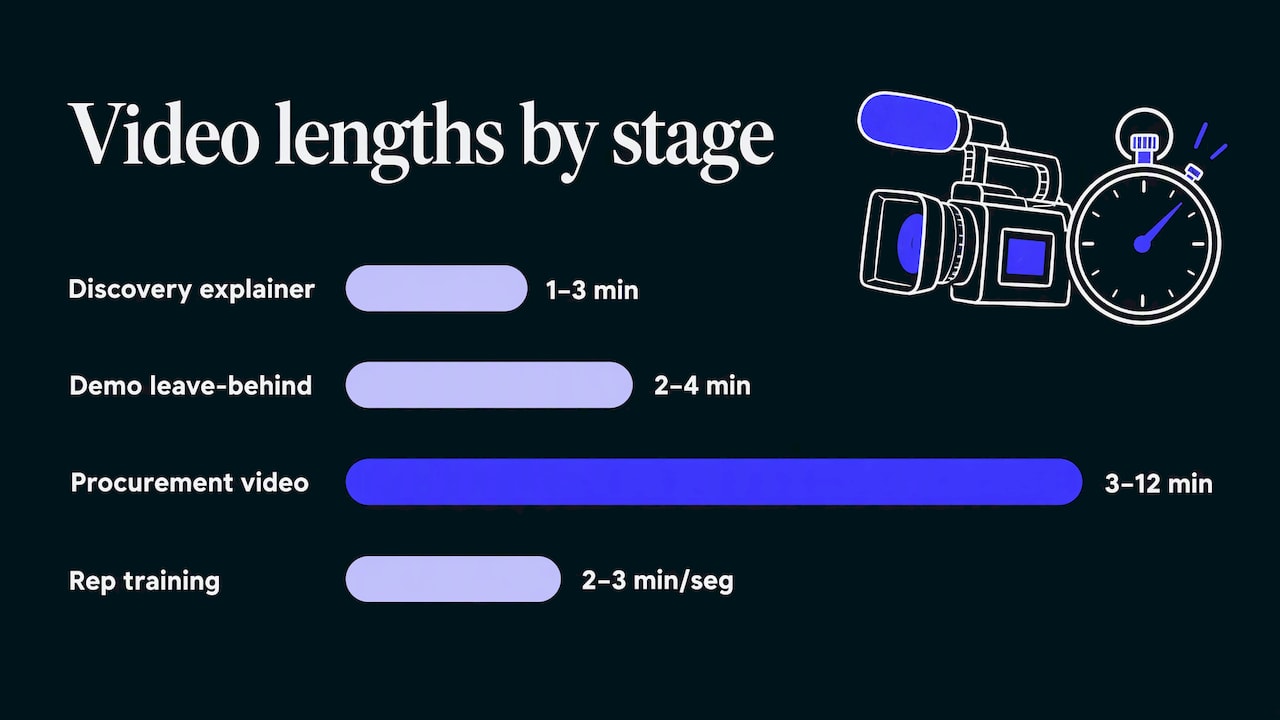
The table maps common formats to the stage where they work. Lengths are typical ranges for each format, not rules, and your audience and product complexity will move them.
| Deal stage | Video type | Typical length | Job it does |
|---|---|---|---|
| Cold outreach | Personalized 1:1 video email | 30 to 90 seconds | Gets a reply by showing the prospect you know their business |
| Discovery follow-up | Use-case or industry explainer | 1 to 3 minutes | Connects the product to the problem they described |
| After a demo | Demo leave-behind | 2 to 4 minutes | Lets the buyer revisit and share what they saw |
| Mid-funnel stall | Objection or comparison video | About 90 seconds | Answers the concern that is holding the deal |
| Decision stage | Customer story | 60 to 90 seconds | Shows proof from a similar company |
| Procurement | Pricing and ROI explanation, case study | 3 to 12 minutes | Gives finance and legal what they need to approve |
| Internal | Onboarding, product training, messaging | 2 to 3 minutes per segment | Gets new reps selling faster and keeps messaging consistent |
These ranges come from published stage-by-stage guides to enablement video and playbooks, which agree on the shape: early videos are short and personal, later videos are longer and evidentiary.
If you are deciding which formats deserve a professional shoot first, our guides to corporate video formats and video styles for SaaS marketing teams walk through the options.
Sales video examples worth learning from
The clearest public numbers come from HubSpot’s sales team, which documented how its reps use video. Two cases stand out in HubSpot’s write-up on video in sales:
- One associate account executive sent 197 video emails of about 70 seconds each, spending roughly 3.8 hours on prospecting. The result was 31 meetings, two closed deals worth $3,143 in monthly recurring revenue, a 93% click-through rate and a 28% response rate.
- Another account executive sent 191 video emails in a single month at three to four minutes of effort per prospect, which created 50 opportunities, a 27% opportunity creation rate.
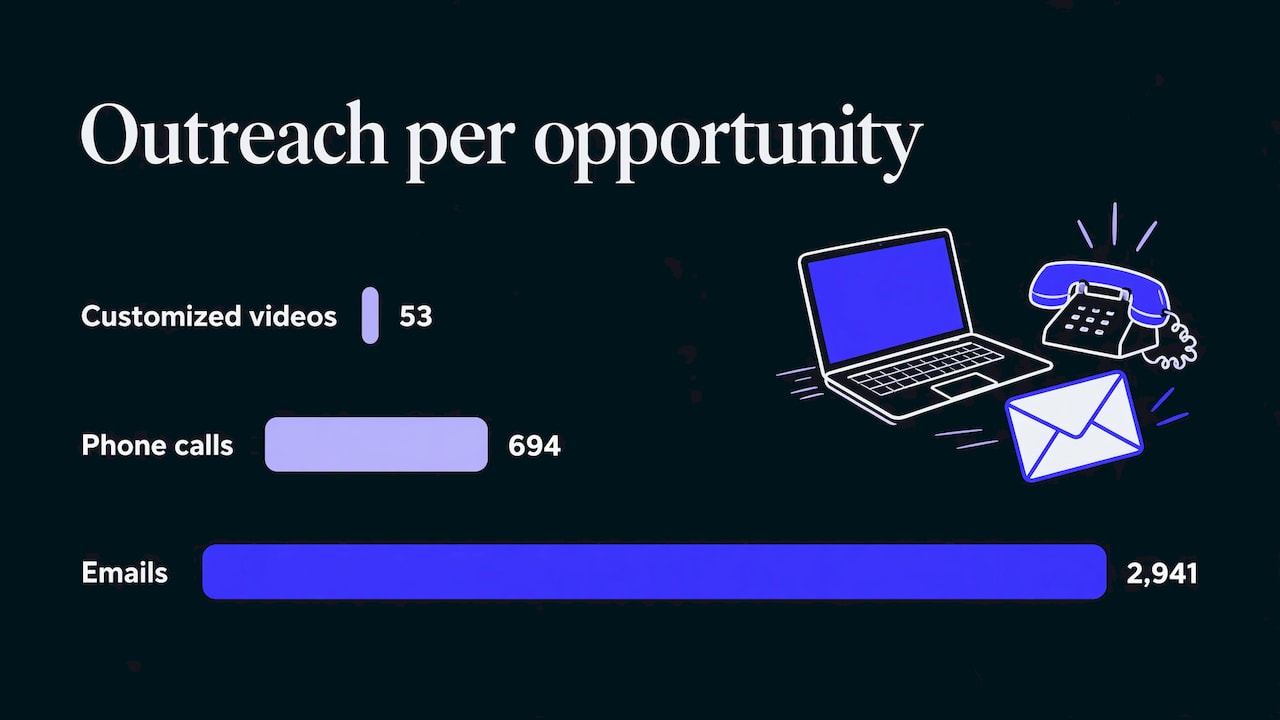
The same guide also cites an experiment by HubSpot’s business development reps over 45 days. Video emails reached an 81% open rate, a 48% click rate and a 26% response rate, against 24%, 6% and 1.2% for plain email. It took 53 customized videos to produce one sales opportunity, compared with 694 phone calls or 2,941 emails.
These are one company’s results and your numbers will differ, but the pattern is consistent and useful:
- Short. Around 60 to 90 seconds for outreach.
- Personal. The prospect’s company and pain point are named, sometimes with their name on a whiteboard in frame.
- One invitation. The video ends with a clear request, usually a call.
Video’s effect also shows up later in the funnel. One B2B agency reported in a 2020 industry report that using video across the customer journey lifted its win rate by 33% and shortened its sales cycle by 41%. Treat single-company figures like these as directional, then set your own baseline.
For longer, polished formats, such as a demo that has to qualify leads, see our SaaS demo example and our collection of B2B video campaign examples.
How to plan and script one
A tight plan is what separates a video reps use from one that sits in a folder.
Pick one question and one outcome
Write a single sentence: “After watching, the viewer can ___.” Fill the blank with a task such as “explain our onboarding to their IT lead” or “decide whether the reporting module fits their workflow.” If a scene does not help the viewer do that, cut it or save it for another asset. This is your editing test.
Script to a structure
For a demo-style video of three to five minutes, a workable structure is:
- Agenda (about 30 seconds). What the viewer will see and why it matters to them.
- The problem story (30 to 60 seconds). The situation your buyer recognizes.
- Competitive context (30 to 60 seconds). How teams usually handle it today.
- The solution (60 to 180 seconds). Three to five features at most, each tied to the opening problem.
- Call to action (10 to 20 seconds). One next step.
This follows a published demo script framework that also notes how heavily viewers now rely on captions and how quickly poor audio costs credibility. Plan captions from the start.
Keep quick videos quick
HubSpot’s guidance is 30 seconds or less for quick tips and three minutes or less for product-related videos. Good lighting and a presentable backdrop matter as much as the script, because a prospect decides in seconds whether the sender looks credible.
Do not let polish replace proof
A video should remove uncertainty. If a buyer needs security documentation, a contract term or a technical review, give them the document or the specialist conversation and use the video to point to it. A beautiful clip never substitutes for what a buyer needs to evaluate risk.
Where production quality pays off
Not every sales video needs a crew. A rep recording a 60-second personal note on a laptop is fine. Production quality matters most in the assets that are reused hundreds of times and shown to senior buyers:
- Customer stories and testimonials. Interviews succeed or fail on lighting, sound and how comfortable the speaker looks. See how to film executive interviews that build trust and how to prepare speakers for video interviews.
- Demo and product walkthroughs. Clear audio, clean screen capture and tight editing keep completion rates up.
- Onboarding and training libraries. Consistent look and sound across dozens of videos signals a company that is organized.
- Event footage. Keynotes, customer panels and booth conversations become sales assets long after the event ends. Our event videography and event photography services cover this coverage.
- Brand-consistent templates. Videos that follow your brand guidelines look like they come from one company, even when different reps send them.
The practical rule: invest in production where the video will be used the most or seen by the buyer who signs.
Getting reps to send the videos
A finished video is not a finished project. The most common failure is an asset nobody uses. Several habits fix that:
- Organize by situation, not by topic. Reps search for “prospect says we are too expensive,” not “pricing.” Label videos by the moment they solve.
- Give each video a watch page with a descriptive title, a short summary or transcript, and the scope of what it covers, so it still makes sense when forwarded.
- Put videos inside the workflow. Link them in email templates, call-prep notes and your CRM, so a rep finds them while working a deal.
- Template the first line. Short, buyer-facing assets work best when the rep adds a sentence of personal context and one request.
- Use video where text fails. A stalled mid-funnel deal gets little from another “just checking in” email. A 60-second video that recaps the points the prospect cared about, names their company and addresses their stated concern gives them a reason to respond.
To see how videos connect to the rest of your pipeline, it helps to understand how a sales funnel moves buyers from awareness to decision, because each video should sit at a defined point on that path.
Measuring whether it works
Measurement needs two layers, and mixing them causes confusion.
Distribution metrics tell you whether the video was seen: sends, plays, completion rate, clicks. Sales outcomes tell you whether it mattered: opportunities created, stage progression, time in stage, win rate.
Match the metric to the video’s job:
| Video job | Primary metric |
|---|---|
| Internal training | Completion and assessment results |
| Outreach video | Qualified replies, meetings booked |
| Demo leave-behind | Evaluation starts, second meetings |
| Customer story | Use in late-stage deals, win rate |
Also track reuse. A video that reps never send points to a discovery or ownership problem, not a production problem. Watch-time data helps too: a prospect who watches most of a demo or rewatches a section is showing intent, and your reps can follow up while it is fresh.
Before launching, record a baseline: reply rates, stage conversion and cycle length for the deals you want to improve. Then compare the same measures after the video has been in use for a full sales cycle. Our guide on how to measure video leads and prove ROI shows how to tie video activity back to revenue. Pair it with a CRM where video activity is recorded against each contact, so the follow-up is visible to everyone working the account.
A realistic first project
If you are starting from nothing, a manageable first phase looks like this:
- Interview three or four reps and list the repeated explanations and stalled moments.
- Choose the two with the most deals attached.
- Script each around one question and one outcome.
- Produce a customer story and one demo leave-behind to a professional standard, since they carry the most weight with senior buyers.
- Train reps on when and how to send them, with a short template.
- Review use and results after one full sales cycle, then expand.
This keeps the library small, useful and tied to revenue. Resist the urge to produce twenty videos at once.
Work with V2 Visuals
When the videos have to carry real weight in front of buyers, our team handles the production. V2 Visuals offers corporate and marketing video production, event videography, photography, video editing and ad creative, supported by a nationwide network of professionals and a process built around return on investment. If you already know the sales moment you want to fix, talk to us at V2 Visuals about building the video around it.

Our perspective
Most sales teams do not have a video problem. They have a clarity problem, and video makes it visible. When a rep cannot explain in 60 seconds why a customer chose you, a camera will not fix that. A clear question and a clear outcome will.
At V2 Visuals we start every project with business goals and the audience, then work back to the footage. Our approach is built around return on investment: a video earns its place when it turns creative work into leads and growth. That is why we push clients to define the buyer, the stage and the next step before anyone picks up a camera.
The second thing we encourage is investing where it counts. A customer story that your team will show for two years deserves proper lighting, clean audio and a considered edit. A quick personal note from a rep does not need a crew. Knowing the difference saves budget and gives your sales team assets they are glad to send.
Finally, plan for the whole library. Consistent visuals, brand guidelines and captions make dozens of videos feel like one company speaking. That consistency builds the trust that shortens deals.
Brandon V
FAQ
What is the best length for a sales enablement video?
It depends on the stage. Outreach and follow-up videos work best at 30 to 90 seconds, product videos at three minutes or less, and demos at two to four minutes. Longer formats such as case studies suit procurement, where buyers want detail.
Who should make the video, sales reps or a production team?
Both have a role. Reps can record quick personalized messages themselves. Customer stories, demos, onboarding series and event footage are reused often and seen by senior buyers, so they benefit from a professional crew and a polished edit.
What should a sales enablement video end with?
One clear next step. That could be booking a call, starting an evaluation or forwarding the video to a colleague. A video with several asks gives the viewer no clear action, and one with none leaves the deal where it was.
How do I know if my videos are working?
Track plays and completion, then compare opportunity creation, stage progression and win rate against a baseline from before the video. Also watch how often reps send each asset. Low reuse usually means reps cannot find it or it does not match a real deal moment.
Sources
- HubSpot: how to use video to accelerate sales
- Stage-by-stage guide to sales enablement videos
- Sales enablement video: a practical B2B guide
- Product demo videos: 2026 guide
- Growing businesses and video content report, Martech Series