


Yes, you can run video ads on LinkedIn, and for B2B teams they are one of the most direct ways to put a message in front of a defined professional audience. They run as Sponsored Content in the feed on mobile and desktop. You upload an MP4 between 3 seconds and 30 minutes long, choose an aspect ratio (4:5, 1:1, 16:9 or 9:16), target by job title, industry or company, and pay by clicks or impressions. This guide covers the specs, the creative decisions that matter, and how to read the results.
TL;DR
- Upload MP4 files, 3 seconds to 30 minutes, 75 KB to 200 MB. LinkedIn recommends 15 to 30 seconds so the ad qualifies for every placement.
- Plan a 4:5 vertical version for mobile feed, plus 1:1 and 16:9 cuts. Export each version separately instead of relying on cropping.
- Most viewers watch with the sound off, so open with the problem or the proof, burn in captions and keep on-screen text short.
- Cost depends on your bid model, audience size, budget and competition, so set the measurement goal before you set the budget.
- Judge awareness campaigns on view rate and watch time, and lead campaigns on cost per lead and pipeline.
Table of Contents
- Where LinkedIn video ads appear and how they work
- LinkedIn video ad specs and dimensions
- Creative that works in a LinkedIn feed
- Which video format fits which goal
- Launching a campaign: targeting, budget and bids
- What LinkedIn video ads cost
- Measuring performance
- Our perspective
- Plan the video before you buy the media
- FAQ
- Sources
Where LinkedIn video ads appear and how they work
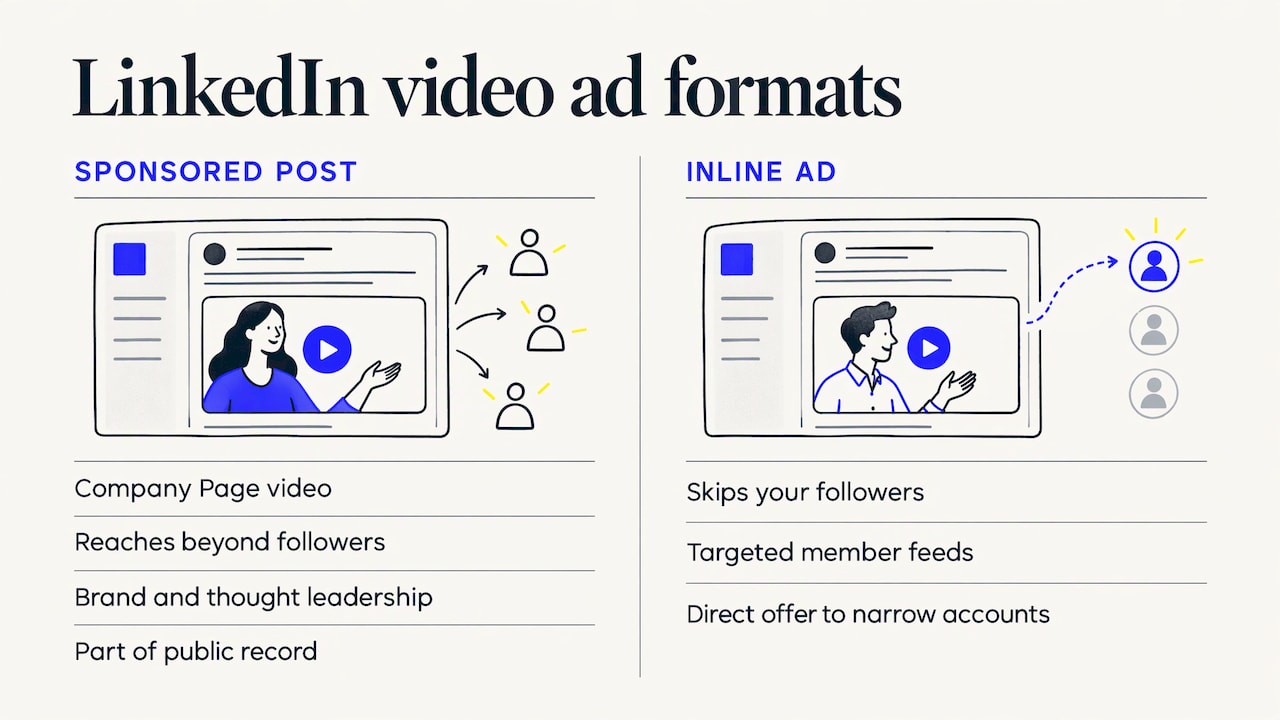
LinkedIn video ads are a Sponsored Content format. They appear in the mobile and desktop news feed, and you have two ways to publish them. You can sponsor a video already posted on your Company Page to reach people beyond your followers. Or you can create an inline video ad that skips your followers and goes straight to the feeds of the members you target.
The inline route is useful when the video is a sales message that would feel out of place on your public page, such as a direct offer to a narrow list of accounts. The sponsored Page post suits brand and thought-leadership content you want to keep as part of your public record.
If you also publish organic posts from founders or executives, plan the two together so paid and organic tell the same story. A guide on executive LinkedIn content and measurement shows how teams think about that mix.
LinkedIn’s own help page notes that videos of 15 to 30 seconds can qualify for all placements across the feed and the Audience Network, including in-stream. That is the single most useful number to plan around when you brief a production.
LinkedIn video ad specs and dimensions
The table below follows LinkedIn’s published video ad specifications. Always check the page before a launch, because platforms adjust limits.
| Spec | Requirement |
|---|---|
| File format | MP4 |
| Length | 3 seconds to 30 minutes (15 to 30 seconds recommended) |
| File size | 75 KB to 200 MB |
| Video codec | H.264 or VP8 |
| Audio | AAC or MPEG4, under 64 kHz |
| Frame rate | Under 30 fps |
| Thumbnail | JPG or PNG, up to 2 MB, same aspect ratio as the video |
Aspect ratios and pixel ranges
| Ratio | Orientation | Minimum | Maximum |
|---|---|---|---|
| 16:9 | Landscape | 640 x 360 | 1920 x 1080 |
| 1:1 | Square | 360 x 360 | 1920 x 1920 |
| 4:5 | Vertical (recommended ratio) | 360 x 450 | 1080 x 1350 |
| 9:16 | Full vertical | 360 x 640 | 1080 x 1920 |
In plain terms: height and width must each be between 360 and 1920 pixels, and the overall ratio can be no wider than 16:9 or taller than 9:16. A 1920 x 360 banner-shaped file will be rejected because its ratio is far wider than 16:9.
Which ratio should you pick?
The practical answer is to prepare more than one. Based on published specification guidance, the usual split is:
- 4:5 for mobile feed, where it takes up more screen than a landscape clip. LinkedIn’s help page marks it as the recommended vertical ratio.
- 1:1 as a safe all-round cut that sits well on both desktop and mobile.
- 16:9 for widescreen assets such as webinar clips, product demos and screen recordings.
- 9:16 for vertical placements. Keep faces, logos and key text inside a central safe zone, and keep subtitles away from the edges.
The cheapest time to solve this is before the shoot. If your production team frames the master shot with a 4:5 crop in mind, you avoid awkward reframing later. Our team builds these deliverables into LinkedIn video ad creative planning from the start.
Creative that works in a LinkedIn feed
LinkedIn is a work context. Viewers scroll between industry news and colleagues’ updates, so the video has to earn attention in the first seconds and then deliver one clear idea.
Open with the problem, benefit or proof
Skip the slow logo intro. Start with the pain your buyer recognizes, the result you deliver or a proof point such as a customer outcome. Show your brand early, but as part of the message rather than as a separate bumper.
Design for sound off
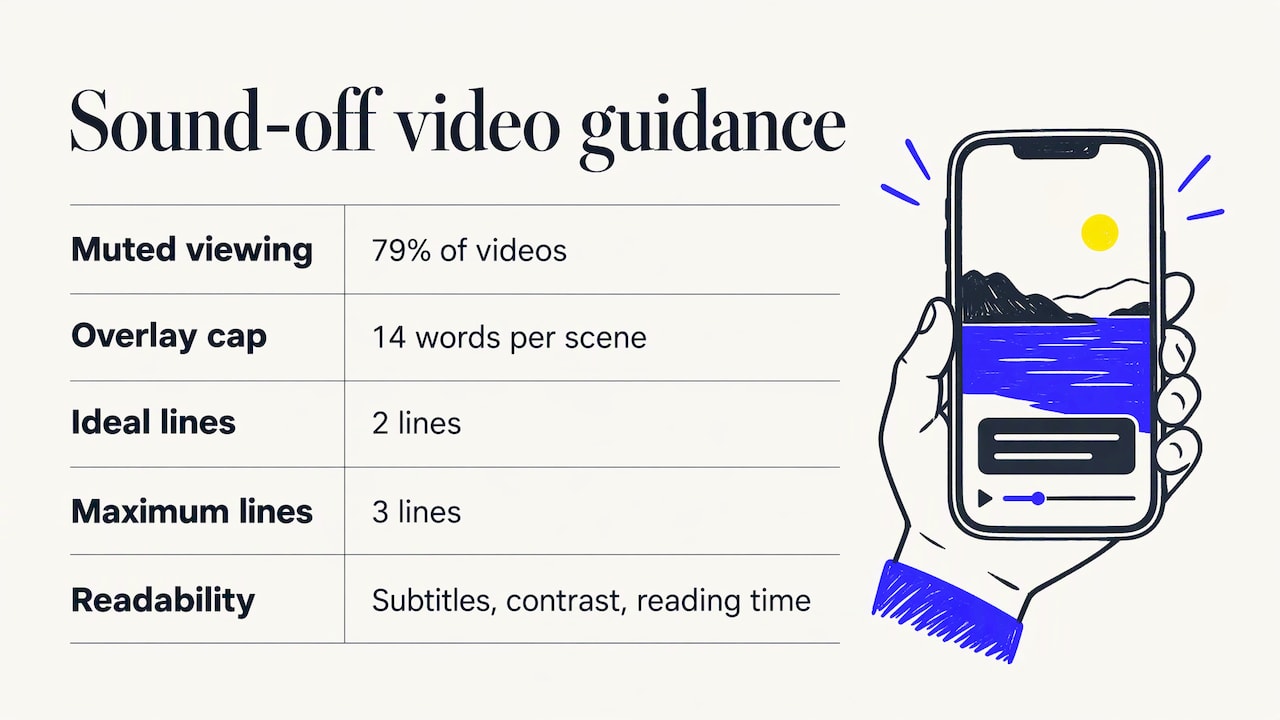
LinkedIn reports that 79% of videos are watched on mute, so a video that depends on audio will lose most of its audience. The IAB UK’s guidance on silent viewers recommends subtitles, concise overlays and visual storytelling, and suggests overlays of no more than 14 words per scene, ideally on two lines and at most three, with enough contrast and screen time to read.
Captions are a production step, not an afterthought. If you need to generate and edit them quickly, this walkthrough on automatic subtitles for video explains the generate, edit and export flow. Always proofread: names, product terms and numbers are where automatic transcripts slip.
Keep one message and one call to action
A 20-second ad that makes one point beats a 60-second ad that makes four. End on a clear next step: watch the demo, download the report, book a call. Longer edits make sense for complex products, webinars or customer stories, but even then the opening should stand on its own.
Write the copy around the video
The introductory text sits above the video. Third-party spec summaries list a limit of 3,000 characters for it and about 200 for the headline, with roughly 70 characters recommended to avoid truncation. Whatever the exact limits are on the day you launch, put the key message at the start, because feed text can be cut off.
A pre-flight checklist for creative
- Does the first two seconds show a problem, benefit or proof?
- Is the video understandable with no sound?
- Are captions and overlays readable on a phone, away from the edges?
- Is there one message and one call to action?
- Do you have the right ratio exports and a matching thumbnail?
- Does the file meet the format, size, codec and frame-rate limits?
Which video format fits which goal
Not every business video belongs in an ad slot. These formats tend to fit LinkedIn well:
- Customer story cuts: a 30-second excerpt of a longer testimonial, with the customer’s result in the first line.
- Product or service explainers: a short demonstration of one use case, framed around the buyer’s problem.
- Executive or expert clips: a single insight from a leader, captioned and framed for mobile.
- Event highlights: a fast recap that makes the next event feel worth attending.
- Recruitment spots: employer brand videos aimed at specific roles.
Our guide to corporate video formats and our page on recruitment video production go deeper on how each type is planned.
Launching a campaign: targeting, budget and bids
In Campaign Manager you choose an objective, such as brand awareness, video views or lead generation, then define the audience and budget. LinkedIn’s Ads Playbook says you can target by job title, function, industry, geography, company, company size, skills and other professional attributes, control daily and total budgets, and pay by clicks or impressions.
A simple launch sequence:
- Pick one objective. Mixing awareness and lead goals in one campaign makes the results hard to read.
- Define a tight audience. Start with the roles that buy or influence the purchase, and a company-size band that matches your offer.
- Upload two or three creative variations. Change one thing at a time: the hook, the length or the call to action.
- Set budget and schedule. Give each variation enough time and impressions to produce a usable result.
- Connect the destination. A landing page that continues the video’s message converts better than a generic homepage.
If you run campaigns through the API or a marketing platform, LinkedIn’s documentation describes a video campaign workflow built from a campaign, a post that contains the uploaded video and a video creative.
What LinkedIn video ads cost
There is no single price. The Ads Playbook explains that cost depends on your CPC or CPM model, your bid, your daily budget, campaign duration and competition for the audience you select. It also lists minimum CPC and CPM bids of $2.00. Real costs usually sit above the minimum, because a narrow, senior or high-demand audience costs more to reach.
Three levers you control:
- Audience specificity. Broader audiences are usually cheaper per impression but less relevant.
- Creative quality. Relevant, watchable video earns better engagement, which supports efficient delivery.
- Objective and bid strategy. Match the bid model to the goal you will measure.
Video production is a separate line from media spend. A common planning mistake is to spend the whole budget on media and run a weak asset. A stronger asset, cut into several versions, usually serves a campaign for far longer. Our post on improving video marketing ROI covers how to weigh the two.
Measuring performance
Campaign Manager reports plays, views, view rate, quartile views, completions, completion rate, average watch time, full-screen plays and cost per view. In the summarized metric definitions, a view is at least 2 continuous seconds with at least 50% of the video on screen.
Match the metric to the goal:
| Goal | Lead metrics | Supporting metrics |
|---|---|---|
| Awareness | View rate, average watch time | CPM as an efficiency check |
| Lead generation | Cost per lead or conversion | Downstream pipeline and revenue |
| Consideration | Completion rate, click-through to content | Cost per view |
For lead generation, the same guidance says cost per conversion or lead and downstream pipeline should outrank watch metrics. A video with a high completion rate that produces no qualified conversations is not working for the business.
Read the quartiles
Quartile views show where viewers drop off. If most leave before 25%, the hook is the problem. If they stay to 75% but do not click, the call to action or the offer needs work. Fix one at a time and test again.
Our perspective
Most LinkedIn video ads fail before the media plan matters. The audience is right, the budget is fine, but the footage was shot for a website hero or an event recap and then squeezed into a feed.
We start from the business outcome and work back to the shoot. That means deciding the hook, the proof point and the call to action before the camera rolls, and framing the master shots so 4:5, 1:1 and 16:9 cuts all hold up. It also means building captions and tight on-screen text into the edit, because your buyer is probably watching on mute between meetings.
One well-planned shoot can supply the ad, the organic post, the landing page video and the sales follow-up. Our nationwide network of crews lets us do that in the cities where your audience and your events are, and our approach is built around return on investment: creative that turns attention into leads.
If your last LinkedIn video got views but no conversations, the fix is usually in the brief, not the budget.
Brandon V
Plan the video before you buy the media
At V2 Visuals we produce video and photography for brands, businesses and events, from corporate and marketing video production to ad creative and social content. For LinkedIn, we plan the concept, shoot and edit with the platform’s formats in mind, so you receive the ratio versions, captions and thumbnails you need to launch.

If you also run short-form content on other networks, our social media video production work uses the same shoot to feed several channels. To talk through a LinkedIn campaign, contact V2 Visuals and tell us your audience and goal.
FAQ
Can you do video ads on LinkedIn?
Yes. Video is a Sponsored Content format that runs in the LinkedIn feed on desktop and mobile. You can sponsor a video from your Company Page or create an inline video ad that goes only to the members you target.
How long should a LinkedIn video ad be?
LinkedIn accepts videos from 3 seconds to 30 minutes. It recommends 15 to 30 seconds so the ad can qualify for all placements, including in-stream. Longer videos can suit webinars, complex products or customer stories.
What is the best aspect ratio and file size for LinkedIn video?
LinkedIn marks 4:5 as its recommended vertical ratio, and it also supports 1:1, 16:9 and 9:16. Files must be MP4 and between 75 KB and 200 MB. Export a separate version for each ratio you plan to run.
How much do LinkedIn video ads cost?
Cost depends on your bid model (CPC or CPM), bid, daily budget, duration and audience competition. LinkedIn’s Ads Playbook lists minimum bids of $2.00 for CPC and CPM. Narrow or senior audiences usually cost more to reach.
Are video ads effective on LinkedIn?
They can be when the creative is built for the feed and tied to a measurable goal. Open with a clear hook, design for sound off, and track view rate for awareness or cost per lead for conversion campaigns.
Sources
- Video ads advertising specifications, LinkedIn Help
- Create and Manage Video Ads, Microsoft Learn
- LinkedIn Ads Playbook
- We can’t hear you! Engaging your silent video viewers, IAB UK
- LinkedIn video ad sizes and specifications
- LinkedIn video ads: specs, length, examples and metrics