



The main types of corporate video are brand story films, promotional videos, product demos, explainers, testimonials and case studies, onboarding and training videos, culture videos, event coverage and executive or investor communications. The right one depends on who needs to be persuaded or informed, and what you want them to do next. This guide explains each format, gives you ideas and examples, and shows you how to choose.
TL;DR
- A corporate video is video made to serve a business purpose: marketing, training, internal communication or stakeholder engagement.
- Marketing formats (brand films, promos, demos, explainers) build awareness and move buyers. Testimonials and case studies build trust.
- Internal formats (onboarding, training, culture) save staff time and keep teams aligned. Event formats extend the life of a one-day investment.
- Pick the format by goal and audience first, then decide on length, style and distribution.
- Most companies get more from a small library of three or four well-chosen videos than from one large production.
Table of Contents
- What counts as a corporate video
- Corporate videos that build awareness and drive sales
- Corporate videos that build trust
- Corporate videos for your own people
- Corporate videos for events, conferences and stakeholders
- Corporate video types at a glance
- How to choose the right corporate video type
- Our perspective
- Work with a team that plans for results
- FAQ
- Sources
What counts as a corporate video
A corporate video is video created specifically to serve a business purpose, such as marketing, training, internal communication or stakeholder engagement. What separates it from other video is intent. Every corporate video has an audience, a message and an action it wants that audience to take.
That audience can be a prospect who has never heard of you, a customer deciding whether to renew, a new hire on day one, a conference attendee who missed a session, or an investor reviewing results. Each needs a different tone, length and level of polish. That is why the question “what types are there?” is really a question about who you are talking to.
The formats below are grouped by that audience: people outside the company, people inside it, and people at or around your events.
Corporate videos that build awareness and drive sales
These formats sit at the top and middle of the funnel. They introduce your company, explain what you do and give buyers a reason to act.
Brand story and company profile videos
A brand story film explains who you are, why the company exists and what you stand for. It is usually the most cinematic format in the mix: interviews, behind-the-scenes footage of your team at work, and strong b-roll of your product, space or customers. It earns a permanent home on your homepage and About page, and it gets reused in sales decks and recruiting.
Ideas: a founder origin story, a day-in-the-life of your operation, a mission film built around a single customer problem you were created to solve.
If this is the format you are weighing, our guide to brand story video production walks through how these films are planned, and brand storytelling videos shows how the narrative is built.
Promotional videos
A promotional video pushes one thing: a service, a launch, a campaign or a seasonal offer. It is shorter and more direct than a brand film, usually 30 to 90 seconds, with a clear call to action at the end. Promos are often cut into several lengths so the same shoot feeds your website, paid social and email.
Ideas: a new service announcement, a product launch teaser, a campaign anthem video, a recruitment push.
Product and service demo videos
A demo shows how something works in practice. It answers the questions a buyer would otherwise bring to a sales call: what does it do, what does it look like in use, how hard is it to get started. Screen recordings, hands-on footage or a mix of both all work, depending on whether you sell software, equipment or a service.
Ideas: a walkthrough of your core feature, an unboxing and setup, a comparison of two service tiers.
Software teams in particular tend to use several styles at once. We cover that in video styles for SaaS marketing teams.
Explainer videos
An explainer takes a complicated idea and makes it simple, often with motion graphics or animation instead of live action. It suits processes that are hard to film, such as data flows or financial products, or services that are easy to misunderstand. One example from the research is an explainer that shows a company’s remote testing process step by step.
Ideas: how your onboarding works, how a regulated process is handled, what happens between purchase and delivery.
Social media and ad creative
Short-form video made for specific platforms follows different rules: the first seconds decide everything, captions matter because many viewers watch without sound, and vertical framing often beats horizontal. Ad creative adds a testing mindset. You produce several variations of hook, length and call to action, then keep the ones that perform.
Ideas: a 15-second teaser cut from your brand film, a customer quote animated with captions, three alternate openings for the same product ad.
Corporate videos that build trust
Buyers in a business setting rarely decide on a single viewing. Trust formats help them feel safe choosing you.
Customer testimonial videos
A testimonial puts a real customer on camera describing the problem they had and what changed. The best ones are specific: a named person, a named company, a concrete result, and a natural delivery rather than a script. Interview-style filming with a clean background and good audio is usually enough. The focus belongs on the person speaking.
Ideas: a 60-second quote reel for your homepage, a longer interview for the sales team, a set of short clips for social.
Case study videos
A case study video goes further than a testimonial. It tells the project story: the situation, what you did, the outcome. It works best when you can show the work itself on screen and include numbers the customer has approved. Sales teams use case study videos to answer the question “have you done this for someone like us?”
Ideas: a before-and-after project film, a customer visit shot on location, a results summary paired with b-roll of the work.
Corporate videos for your own people
Internal video is often the best return on a production budget, because one video replaces the same explanation repeated dozens of times. Research lists several uses: training videos can cover onboarding, process training, health and safety, software tutorials and compliance.
Onboarding videos
Onboarding videos introduce new hires to the culture, values and processes of the company. One example is a culture and values onboarding series that gives employees a consistent first impression no matter which office or team they join.
Ideas: a welcome message from leadership, a tour of the offices, a how-we-work series by department.
Training and how-to videos
Training videos are practical and procedural. Keep them short, focused on one task each, and easy to search so people can find the answer when they need it. Health and safety and compliance training benefit most from consistency: everyone sees the same instruction, delivered the same way.
Ideas: a software tutorial series, an equipment safety walkthrough, a compliance refresher that is clear enough to be watched voluntarily.
Culture and recruitment videos
Employee stories show what working at your company is like. Employee testimonials can share positive experiences and appear on recruitment platforms, so one shoot can serve your careers page and your internal channels.
Ideas: team member profiles, a behind-the-scenes look at a project, a short film on a company event or tradition.
Internal communications
Leadership updates, town halls and policy announcements land better on camera than in a long email. These are the least polished corporate videos by design. Clear sound, good lighting and a comfortable speaker matter far more than cinematic style.
Corporate videos for events, conferences and stakeholders
An event happens once. Video lets it keep working for months.
Event highlight reels
A highlight reel condenses a conference, launch or gala into a one- to three-minute story. It is the format most companies reuse: promoting next year’s event, showing sponsors what they paid for, and giving attendees something to share. For what separates a forgettable reel from a good one, see our piece on what makes a great event highlight reel.
Speaker recaps and session capture
Event coverage can include raw footage, livestreams, edited highlight reels or speaker recaps. Session capture lets people who could not attend watch the content later, and short speaker clips are among the easiest event assets to share on social platforms.
Sound shapes how an event feels on video as much as picture does. If live music is part of your program, plan it with your videographer. This checklist for corporate event background music is a useful starting point for the audio side of the day.
Livestreams
A livestream extends your room to a remote audience. It needs more planning than recorded coverage: reliable connectivity, a backup plan, a producer watching the feed and a clear idea of what remote viewers will do while they watch. Many teams stream the keynote and record everything else.
Investor and stakeholder videos
Corporate communications can include tailored earnings reports and stakeholder briefings for investors. These are formal, accuracy comes first, and your legal or finance team should review the script. Studio-quality lighting and sound signal seriousness.
Corporate video types at a glance
| Type | Main audience | Typical goal | Typical length |
|---|---|---|---|
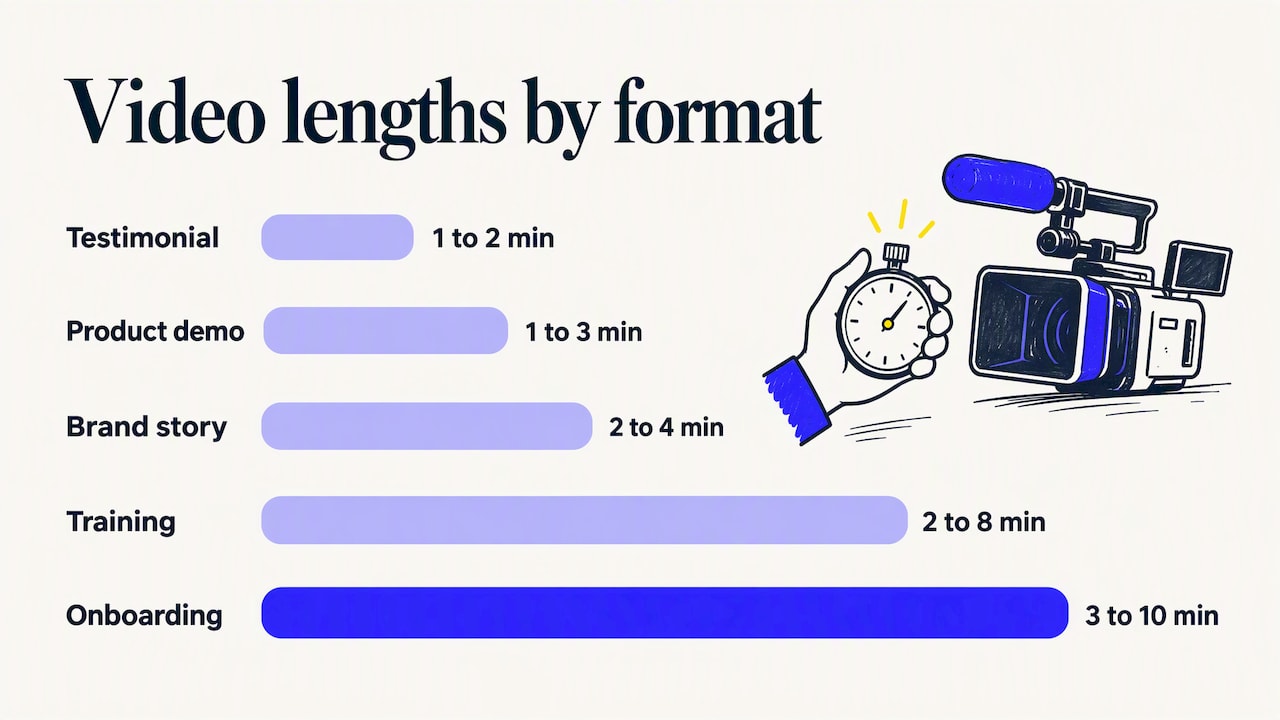
| Brand story | Prospects, recruits, partners | Awareness, credibility | 2 to 4 minutes |
| Promotional | Prospects, customers | Drive an action | 30 to 90 seconds |
| Product demo | Active buyers | Shorten the sales cycle | 1 to 3 minutes |
| Explainer | New audiences | Make an idea clear | 60 to 120 seconds |
| Social and ad creative | Platform audiences | Reach, clicks, leads | 6 to 30 seconds |
| Testimonial | Late-stage buyers | Build trust | 1 to 2 minutes |
| Case study | Late-stage buyers | Prove results | 2 to 4 minutes |
| Onboarding | New employees | Consistency, speed to productivity | 3 to 10 minutes |
| Training | Employees | Skill, compliance | 2 to 8 minutes per topic |
| Culture | Candidates, staff | Hiring, retention | 1 to 3 minutes |
| Event highlight | Attendees, sponsors, prospects | Promotion, proof | 1 to 3 minutes |
| Executive or investor | Stakeholders | Inform, reassure | Varies |
The lengths are practical starting points based on how viewers use each format, not fixed rules. Let the story decide.
For a wider look at which formats pay off, our overview of the best corporate video formats for growth goes into more detail.
How to choose the right corporate video type
Most businesses do not need all twelve formats. They need the two or three that fit where they are right now. Work through these questions in order.
- Who is the viewer? Name one audience: a prospect, a customer, an employee, an attendee, an investor. If you list four, you are planning four videos.
- What should they do afterward? Book a call, sign up, finish a training module, share the video, renew a contract. A video without a defined action is hard to judge.
- Where will they watch it? A homepage, a sales email, a social feed, an LMS or a conference screen each dictates length, framing and sound design.
- What is the shelf life? A brand film or training video may serve you for years. A promo for a seasonal campaign will not. Spend more on what lasts.
- What can be reused? Plan the shoot so one day on location yields the long film, short cuts, stills and social clips.
A simple starting stack for many B2B companies is a brand story film, one testimonial or case study, and a set of short cuts for social. A company with a large team might add onboarding and training. An organization that runs conferences will want event coverage before anything else.
Match the format to the stage of the buyer
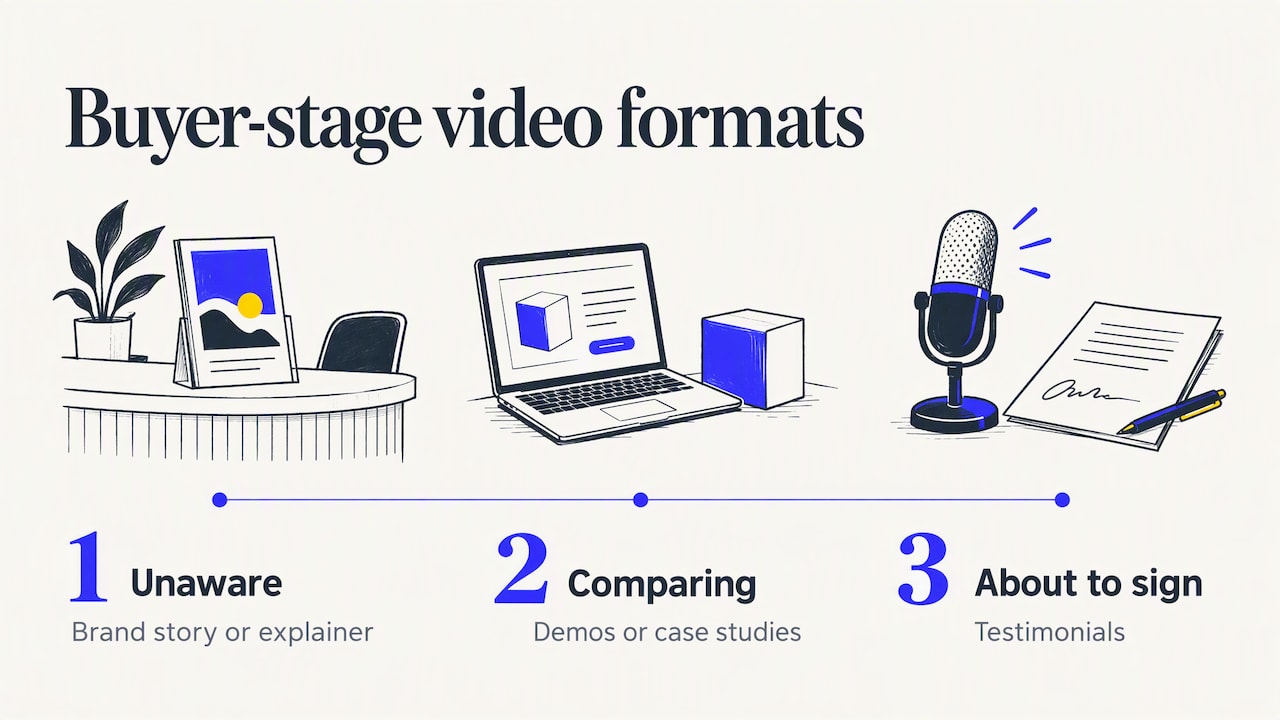
If buyers do not know you, begin with a brand story or explainer. If they know you but are comparing options, use demos and case studies. If they are about to sign, a testimonial from someone like them is often the nudge that helps. Mapping your videos to these stages stops you from putting a long brand film in front of someone who just wants to see the product.
Think about quality and consistency
A corporate video represents your company wherever it appears. Audio quality, lighting, color and on-screen graphics should follow your brand guidelines, so a viewer who sees three videos recognizes one company. Poor sound is the most common reason a good idea falls flat, so budget for it.
Our perspective
Most businesses we meet ask for “a video,” when what they need is a clear answer to a business question. How do we win more of the right customers? How do we make our events pay back? How do we get new hires up to speed faster? The format follows from that question.
We start every project by asking about goals and audience, and we work backward from the result the video has to deliver. That is the reason we pair creative direction with a return-on-investment mindset: the shoot should turn into leads, retention or growth, not just a nice file.
We also plan reuse from day one. A single production day can produce a main film, short social cuts, stills and an event recap, so each dollar covers more ground. And because our crews work through a nationwide network of professionals, the right team can show up where your project is, whether that is a studio shoot, an office or a multi-day conference.
If you are unsure where to start, begin with the audience that matters most to revenue this quarter and build outward from there.
Brandon V
Work with a team that plans for results
If you know which formats you need, we can handle the whole process: concept, filming, editing, motion graphics and delivery in the versions you will actually use. Our corporate, marketing and brand story video production covers the marketing and internal formats above, and our team also covers event videography and photography for conferences, launches and corporate gatherings.

Tell us who you need to reach and what you want them to do, and we will recommend the right mix of formats. Start your project with V2 Visuals and get a plan built around your goals. If you prefer a local team, we also offer corporate video production in Los Angeles, San Francisco and San Diego.
FAQ
What are the most common types of corporate videos?
The most common are promotional videos, brand story videos, explainers, product demos, testimonials, training and onboarding videos, and event coverage. Most companies begin with a brand story or promotional video and add others as needs grow.
Which corporate video should a small or mid-size business make first?
Start with the format closest to revenue. For many B2B companies, that is a brand story film or a customer testimonial, because both support sales conversations and live on your website. Once that is in place, add short social cuts from the same footage.
How long should a corporate video be?
It depends on the format and where it is shown. Promos and social videos work best in seconds or under a minute and a half, while brand films, case studies and training modules can run a few minutes. Aim for the shortest length that fully delivers the message.
Can one shoot produce several types of video?
Yes, and it is the most cost-effective way to work. With planning, one production day can yield a main film, short clips for social, still photos and a testimonial. Tell your production team about every use up front so they capture the right angles, audio and framing.
What corporate videos work for events?
Highlight reels, speaker recaps, session recordings and livestreams are the usual choices. A highlight reel promotes the next event and shows sponsors the value they received, while session capture gives people who could not attend access to the content.
Sources
- Corporate Video Production: Process, Examples & How AI Can Help (Kaltura)
- 4-Point Planner’s Checklist for Corporate Event Background Music