



A good video shoot checklist runs across four gates: a locked brief, shoot-ready logistics, a verified shoot day, and a clean post-production handoff. Most problems on set (a missing release, a dead battery, an unclear approver) are decided days earlier, so the checklist below starts before anyone picks up a camera. It is written for marketing teams, event organizers and business owners who commission video and want it to produce leads, not just footage. If you would rather have a crew own this list from brief to delivery, our video production team works from the same gates.
TL;DR
- Lock the brief first: goal, audience, the action you want viewers to take, runtime, versions, budget and one named approver.
- Before shoot day, confirm script, shot list, crew, locations, permits, releases and insurance in writing.
- On set, verify formats, audio and backups as you go, and log every completed scene, release and incident.
- After the shoot, store footage in two places, agree review rounds, and write down the export specs for every platform.
- Archive originals, project files, music licenses and releases together so a recut next year takes hours, not weeks.
Table of Contents
- The four gates of a video shoot
- Gate 1: The brief and creative plan
- Gate 2: Shoot-ready logistics
- Gate 3: Shoot day
- Gate 4: Post-production, review and delivery
- A one-page version you can copy
- Our perspective
- Let a production team run the checklist
- FAQ
- Sources
The four gates of a video shoot
It helps to treat the project as four gates rather than one long list. One video production contract checklist uses the same logic: a brief gate, a shoot-ready gate, a post-production gate and a release gate. Nothing moves to the next gate until the current one is signed off.
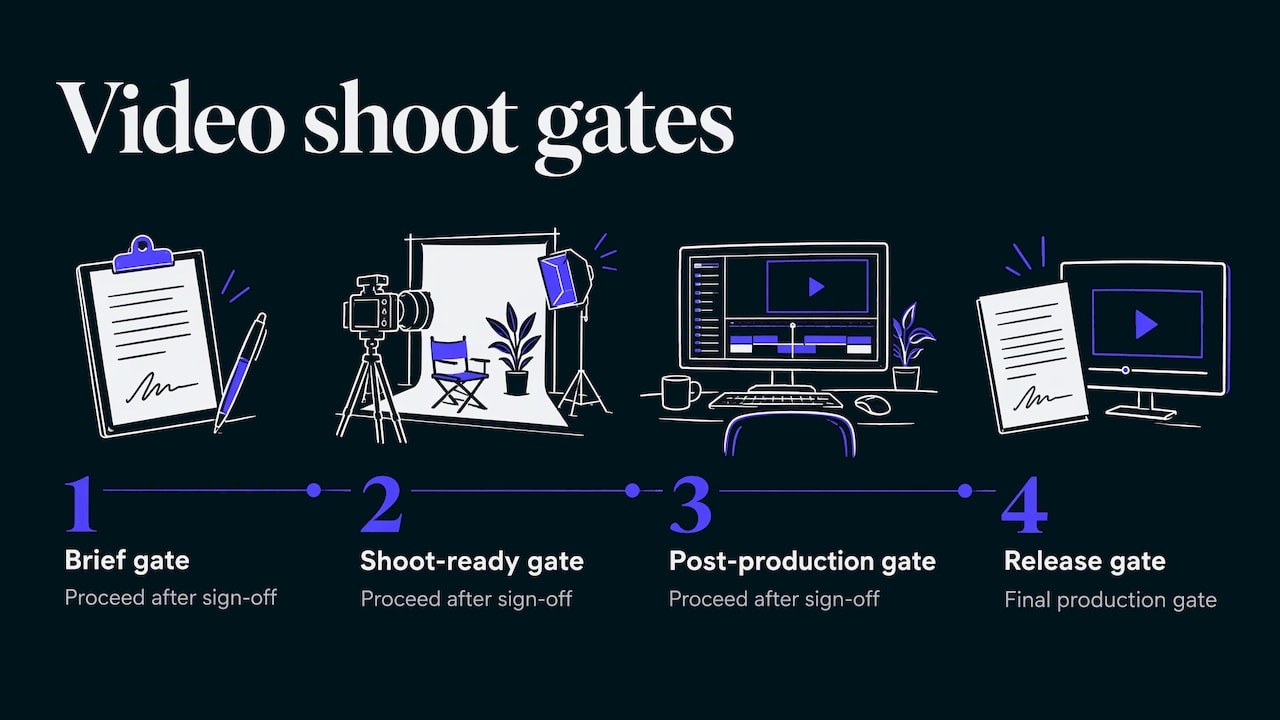
The reason this works is cost. Changes are cheap on paper and expensive on set. Changing a line in a script takes a minute. Reshooting a speaker because the release was never signed can take a day of crew time plus a rebooked venue. A gate structure forces the cheap decisions to happen first.
Gate 1: The brief and creative plan
This gate answers why the video exists. If your team cannot answer these in one page, the shoot is not ready to be scheduled.
What the brief must settle
- Purpose and post-view action. What should a viewer do after watching: book a demo, register for next year’s event, apply for a job? Krock.io’s workflow guide puts purpose, audience and post-view action at the start of pre-production for this reason.
- Audience. Name a specific group, such as procurement leads at mid-sized manufacturers, not “customers.” Use the marketing research you already have.
- Length, placement and versions. Adobe’s commercial guide points out that placement drives format: a square 1:1 cut suits Instagram, while 16:9 suits YouTube. Decide this before shooting so you frame for every version. A typical spec might read: one 90-second master plus three cutdowns.
- Budget and deadline. Include a contingency line. One pre-production checklist notes that 10% is common on indie budgets, with more for stunts, water, animals or minors.
- A single decision owner. Name the person whose dated, written approval counts as final acceptance. Without that, feedback arrives from six people and contradicts itself.
Script, storyboard and shot list
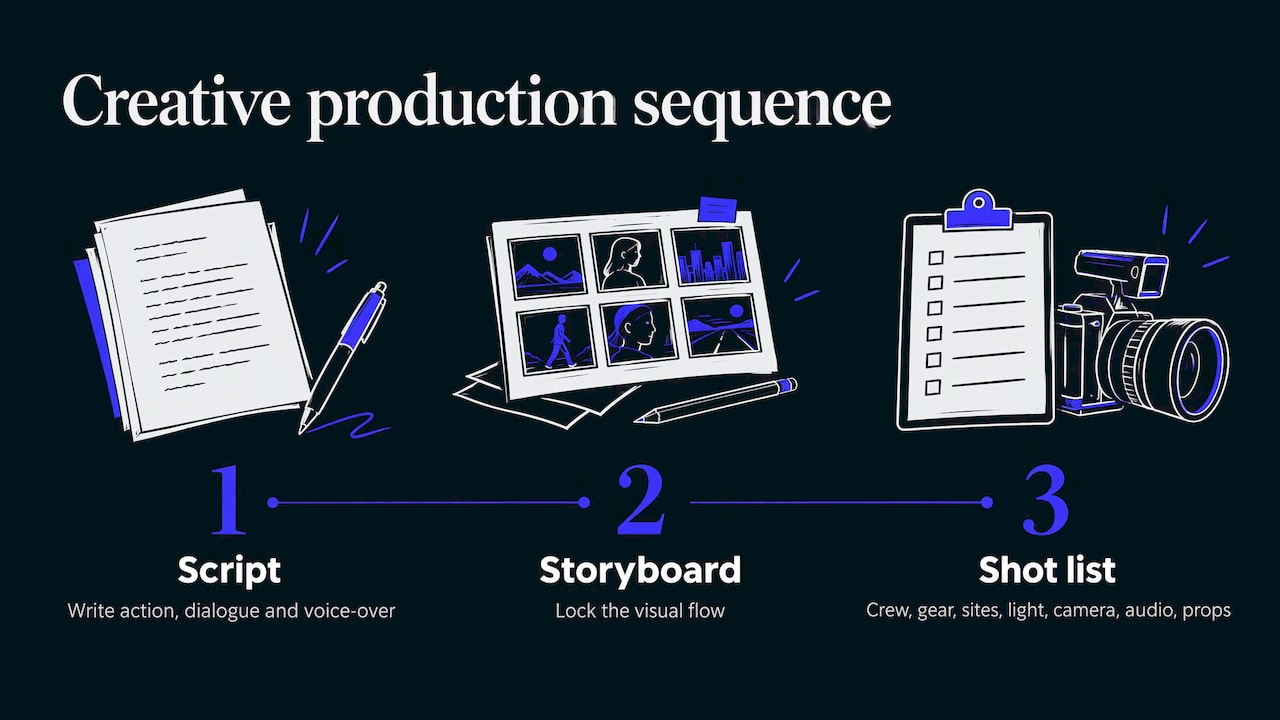
Once the brief is approved, the creative work follows a fixed order: script all action, dialogue and voice-over, build a storyboard to lock the visual flow, then convert it into a shot list. Adobe’s guide describes the shot list as the document that also specifies personnel, equipment, locations, lighting, props and costumes.
For each scene, note the product or subject, location, people, props, lighting, camera setup and audio. Roboneo’s product video guide adds a practical scheduling tip: group similar shots and film them together instead of following the final edit order, for example all the bathroom shots before moving to the bedroom setup. On a corporate shoot that means all the boardroom interviews in one block, then the factory floor.
Gate 2: Shoot-ready logistics
This is the gate most first-time commissioners underestimate. A shoot-ready project has crew, equipment, locations, access, releases, permits, safety and a backup plan all confirmed.
Crew and equipment
- Key roles confirmed in writing: producer, director of photography, sound, and for larger sets a first assistant director, gaffer and grip. ProdSlate’s checklist lists these as key crew to contract before filming.
- Rental orders finalized right after the tech scout so they match the final shot list, as StudioBinder’s pre-production guide advises.
- Insurance quotes for general liability, equipment and workers’ compensation.
- A call sheet, shot list, schedule and one-page look reference. These four documents are what let every department work from the same plan.
Locations, permits and releases
Whether you need a permit depends on the city and what you are doing, so check with the local film office before you book a date. Spokane, Washington is a useful example. Its official filming manual requires a Master Film Permit when filming interrupts street or sidewalk traffic, uses a commercial tripod or dolly on sidewalks or streets, takes place on city-owned property, or affects public property or parking. Other cities set their own thresholds and fees, and some, like Los Angeles, route applications through a dedicated film office.
Start early. StudioBinder warns that locations can fall through over permitting, and that unpermitted shoots can be shut down after neighbor complaints. Film-office timelines can run for weeks, and some cities ask for a fire marshal’s sign-off first.
For private venues such as hotels, convention centers and offices, get a signed location agreement that covers load-in times, power access, noise rules and any restrictions on lighting or drone use.
Then prepare releases:
- Talent releases for everyone who appears on camera.
- Location releases for private property.
- Licenses for music, fonts and any third-party footage or logos in the frame.
For events, attendee notice is part of this. Posted signage that tells guests filming is under way is standard practice at conferences, and your venue contract and legal counsel can confirm what your event needs.
Pre-shoot equipment test
Test everything before packing, not at the venue. CinePlan’s checklist says to test camera, audio, lighting, power, timecode, media and special equipment, then pack labeled media, batteries, chargers, backups, paperwork, petty cash and emergency contacts. Some practical minimums from the same research: pack at least twice the media you expect to use, 3 to 4 charged batteries per camera, a rugged SSD for field backups, a backup camera body, and a full audio kit with a shotgun mic, wireless lavalier set, monitoring headphones, portable recorder, XLR cables and windscreen.
Gate 3: Shoot day
On the day, the checklist shifts from planning to verification. The job is to confirm that what you are capturing is usable.
Before the first take
- Arrive early enough to walk the space with the director and confirm power, Wi-Fi, parking and load-in.
- Verify recording format, frame rate, audio channels and timecode on every camera.
- Run a sound check in the actual room. Audio problems are the hardest to fix later.
- Confirm who is the on-site contact for the client side and who can approve changes.
During filming
CinePlan’s list suggests tracking completed scenes, continuity notes, signed releases and incidents as you go, and checking remaining media, batteries and backup capacity regularly. A few habits make that easier:
- Keep a running shot log against the shot list, ticking off each setup.
- Capture clean audio for every interview, plus room tone, which is 30 seconds of the space’s ambient sound that editors use to smooth cuts.
- Shoot cutaways (hands, product details, environment) beyond what the script lists. They save edits later.
- Collect signed releases before people leave, not afterward.
- Mark standout takes while they are fresh.
If the shoot is an event
Events cannot be re-run, so the checklist is built around moments. Get the run of show before the day, then mark the moments that must be captured: keynote openings, product reveals, award presentations, sponsor activations, audience reactions and executive hallway interviews. Decide who needs a photographer and who needs a videographer, and agree a short list of must-have speakers and VIPs. Our guides on planning conference video and a corporate event videography checklist go deeper on those moments, and our overview of what a corporate event video package includes helps you scope coverage.
Wrap-up on set
Before the crew leaves: confirm every card has been offloaded and backed up, count the releases against the cast list, photograph the location as you found it, and agree when you will see the first selects.
Gate 4: Post-production, review and delivery
Footage handling after the shoot decides whether the project finishes smoothly.
Secure the footage
Storyflow’s checklist sets a clear standard: footage in two places and verified, a naming convention a second editor can follow, notes from the day attached and selects marked. Platform Executive’s guide adds a master backup plus an off-site copy, and a post-production brief covering editorial notes, color grading intent, deliverables, versioning, captions and metadata. Give the editor a scene list, shot log, sound notes and any client references.
Review without chaos
Build the review process into the schedule. Three rules keep it tight:
- Internal review first. Someone other than the editor should watch the cut before the client does, a point Krock.io’s Anna Brown makes.
- One feedback channel. Collect consolidated comments through a single platform, not six emails and a chat thread.
- Lock picture before polish. Sound design, color grading and VFX are expensive to redo, so they should only start once the edit is locked.
Set a fixed number of review rounds and name the approver whose written approval ends the project. Our video production timeline lays out phases and review dates so you can plan around them.
Export specs and delivery
List one row per deliverable: platform, aspect ratio, length, captions, file format and recipient. Confirm codec, resolution and platform requirements before the final export, because even a single platform such as YouTube has its own resolution, bitrate and container requirements, as Krock.io notes. Typical specs written into contracts include a 4K ProRes master and a 1080p H.264 file with captions.
Captions and transcripts do double duty. Once you have them, you can repurpose video into written formats such as summaries and chaptered notes for your site and newsletters. For event content, our guide to repurposing event footage covers how to turn one shoot into months of content.
Archive
Store camera originals, project files, fonts, music licenses and releases together. Krock.io suggests keeping project files for at least 12 months and writing a wrap document that records creative decisions and where assets live. That archive is what makes a recut, a new cutdown or an ad variation quick and cheap.
A one-page version you can copy
| Gate | Must be true before moving on | Owner |
|---|---|---|
| Brief | Goal, audience, post-view action, runtime, versions, budget and approver written down | Marketing lead |
| Creative | Script, storyboard and shot list approved | Marketing lead and director |
| Shoot-ready | Crew, gear, locations, permits, releases, insurance confirmed in writing | Producer |
| Shoot day | Formats, audio and backups verified; shot log and releases complete | Director and producer |
| Post | Footage in two places, naming convention, one feedback channel, review rounds set | Editor and producer |
| Delivery | Export specs per platform met, written approval received, archive stored | Producer and approver |
Our perspective
Most checklists treat a shoot as a logistics exercise. We treat it as a business decision. The first question we ask is what a viewer should do after watching, because that answer shapes the script, the shot list and every cutdown that follows.
Our approach is built around return on investment: creative work filtered through business outcomes, so footage becomes leads and growth rather than a file on a shared drive. That is why the brief gate matters so much to us. A video that is clear on its audience and its action is easier to shoot, easier to edit and easier to measure.
We also know that businesses rarely shoot in one place. Our network of professionals across the nation and specialized crews in major cities means the same standards of planning and coverage can follow your team to the venue, whether that is a conference in San Francisco, a corporate production day in San Diego or an event in Los Angeles.
Use the checklist above on any project. When the stakes are high, such as a brand film, a flagship event or a campaign that needs several versions, give it to a team that works through these gates every day.
Brandon V
Let a production team run the checklist
V2 Visuals produces corporate video, marketing video, branding and storytelling video, event videography and photography for brands, businesses and event organizers. If you want the gates above handled by a crew that plans around your goals and audience, start with our video production services.

For events, see our event videography services in Los Angeles and San Francisco, or contact us through v2visuals.com to talk through your project.
FAQ
How early should I start a video shoot checklist?
Start as soon as the project is approved, ideally weeks before the shoot. The brief, script and permits take the longest, and film-office timelines for permits can run for weeks. Shoot-day items are the last to be finalized.
What is the difference between a shot list and a call sheet?
A shot list details every shot you need, scene by scene, with location, lighting, camera setup and audio. A call sheet is the daily logistics document: who arrives when, where, with what contacts and schedule. You need both on shoot day.
Do I need a permit to film a corporate video?
It depends on the city and where you film. Public streets, sidewalks, city-owned property or the use of a commercial tripod can trigger a permit, as in Spokane’s filming manual. Check with the local film office, and for private venues, get a written location agreement.
What should I have after the shoot is finished?
You should have footage stored in two places, a shot log and notes, signed releases, and a deliverables table with export specs for each platform. After final approval, archive originals, project files and music licenses together.
How many versions of the video should I plan for?
Decide before the shoot. A common spec is one master plus a few cutdowns, with aspect ratios matched to each platform, since framing for 1:1 and 16:9 is easier when planned on set.
Sources
- Video Production Contract Checklist
- Video production workflow: 5 stages from brief to delivery
- How to make a commercial
- The Pre-Production Checklist
- How to Make a Product Video
- The Ultimate Pre Production Checklist for Film
- Filming in Spokane Manual
- Film Production Checklist: Pre-Production to Wrap
- Video Production Checklist: Brief to Delivery
- How to Plan a Video Shoot: A Step-By-Step Guide
- Repurpose Video Content Into Written Formats